Dev UI
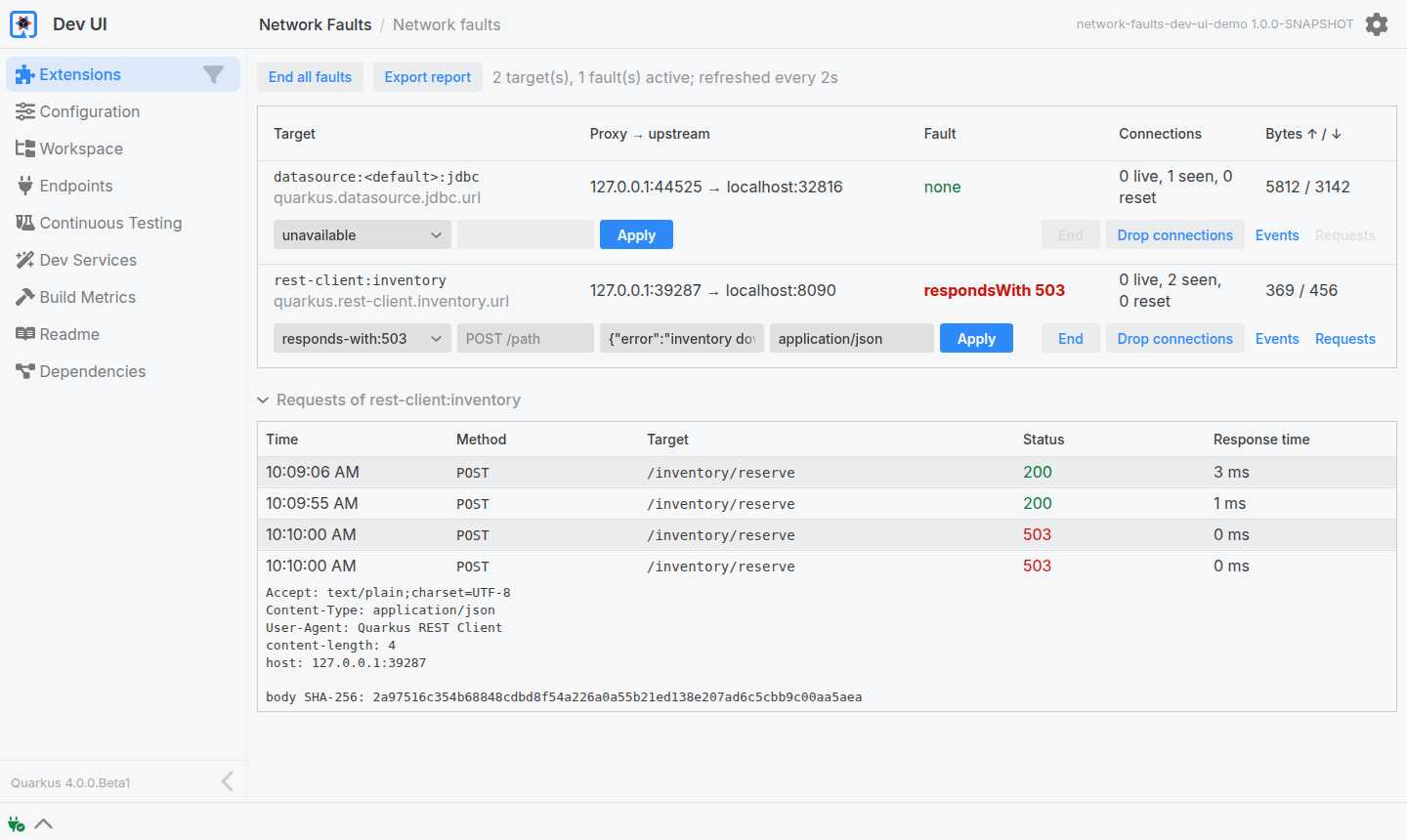
In dev mode, the Resiliency Testing card lists every target and applies and ends faults on the running application. Each target also shows what its last fault did, and the session can be exported as a Markdown report.
Enabling It
Fault injection is build-time configuration, so the card needs the flag in the dev profile:
%dev.quarkus.resiliency-testing.enabled=trueWithout it the card says so and shows nothing else. With it, every outbound connection the configuration describes is proxied as it is in tests, and the card lists one row per target: its name and the property it came from, the proxy and upstream addresses, the active fault, and its connections and bytes. Everything on the card refreshes every two seconds; there is nothing to reload by hand.
Applying a Fault
Under each row are a fault field, a requests field and an Apply button.
The fault field offers every fault with what it does, and takes any other argument typed in, such as slow:2s.
A fault is written as the test API would call it, lower case with dashes, and an argument after a colon:
| Spec | Fault |
|---|---|
|
|
|
|
|
|
|
|
|
|
|
|
|
|
|
|
|
|
The requests field scopes the fault to some requests, as http().requests(method, path) does: POST /inventory/reserve faults those requests only, and an empty field faults every connection.
It is not accepted with unavailable or connect-timeout.
Applying a fault to a whole target ends whatever fault the target has first, so switching faults is one click; the test API throws instead, see Faults. A fault on some requests ends nothing, so several can be combined, and one that conflicts with an active fault is refused with the reason. End ends the target’s faults, End all faults every fault of every target, and Drop connections resets the live connections once.
responds-with, the headers, chunks and sse moments and the requests field need a target reached over plaintext HTTP.
For any other target, a datasource or a client configured with an https:// URL, the card leaves them out, and hovering says why.
The faults under advanced(), latency with jitter, bandwidth and slicing, are only reachable from the API.
Events
Events opens the event log of a target, newest first: the listener binding and unbinding, faults starting and ending, connections opening, closing and being reset, every HTTP request seen, and upstream connects that failed. The log keeps the last 500 events.
Requests
Requests opens the HTTP requests a target sent, oldest first: when, the method, the path and query string, the response status and the response time.
Clicking a request shows its headers and the SHA-256 of its body.
A request that was never answered or is still in flight has no status.
One answered by respondsWith carries the status it was answered with.
This is what traffic().httpRequests() returns in a test, see Counting Calls, so it is only there for a target reached over plaintext HTTP; for any other, the button is disabled and hovering says why.
The Last Fault
Once a fault has ended, the Fault column of its target says what it did: saw n connection(s), m request(s), or no traffic when nothing went through the proxy while it was active, which is the dev-mode form of the guard: such a fault cannot have affected the application, and the target is probably not the one the request goes through.
unavailable and connect-timeout read not judged instead, as the guard exempts them: refused and dropped connections never reach the proxy, so what the application did is the evidence.
So does an exhaustion the guard cannot watch, the worker pool and the pools listed in The Guard.
Behind the column is a history of every fault applied since the application started, whether from the card, a Dev MCP tool or application code, capped at the last 500; the getHistory Dev MCP tool returns it in full.
Report
Export report in the toolbar renders a Markdown report: the targets with their property, upstream and active fault, every fault of the history with whether traffic went through it, and the counters of each target.
Copy puts it on the clipboard and Download saves it as resiliency-testing-report.md, to paste into an issue, a pull request or an agent conversation.
Driving the Card from an Agent
Everything the card does is also a Dev MCP tool, so an AI agent can apply faults to the running application, observe what it does, and write the test that pins it down. Enabling Dev MCP, the tools that are opt-in, and the resources the agent reads first are described in AI Agents.