Goblin - Chaos Engineering Extension for Quarkus
Goblin is a chaos engineering extension for Quarkus that lets you inject latency, exceptions, HTTP failures, and dependency degradation into your running application — without touching a single line of source code.
It is designed for one specific purpose: verifying that your resilience mechanisms actually work. You declared @Timeout, @Fallback, @Retry, health probes, or circuit breakers? Goblin gives you the tool to prove they hold under real failure conditions.
| Think of Goblin as Chaos Monkey for the Quarkus ecosystem — but with stronger safety guarantees. |
Why Goblin?
Quarkus has excellent resilience primitives (MicroProfile Fault Tolerance, Mutiny reactive timeouts, health probes), but no built-in way to trigger the failures these mechanisms are supposed to handle. You end up writing fragile integration tests that mock exceptions, or worse, discovering production failure modes for the first time in production.
Goblin fills that gap: inject realistic failures at the HTTP layer during development, observe how your application reacts, and iterate.
Key design decisions:
-
Dev mode only. Chaos artifacts are physically absent from production builds. Not disabled — absent. There is no toggle to forget to switch off.
-
Zero code modification. No
@ChaosLatencyannotations to scatter across your endpoints. Configuration is the only interface. -
Non-destructive. You can target specific packages, exclude annotated methods, and control the percentage of affected requests.
-
Composable. Multiple assault types can be active simultaneously on the same request.
-
Persistent state. Dev UI config changes survive restarts via automatic disk persistence (
.goblin-state.json).
Quick start
Add the dependency
<dependency>
    <groupId>io.quarkiverse.goblin</groupId>
    <artifactId>quarkus-goblin</artifactId>
    <version>${goblin.version}</version>
</dependency>
That’s it. Start your application in dev mode:
./mvnw quarkus:devYou will see a warning log confirming chaos is active:
WARN Chaos engineering active: 100% of REST requests subject to assault (latency=true, exception=false, httpStatus=false, dependencyDegradation=false)Verify it works
With the default configuration (latency assault enabled, 100% of requests), every REST endpoint will have an artificial delay applied. Hit any endpoint and observe the added latency:
curl -w "\nTime: %{time_total}s\n" http://localhost:8080/api/helloYou should see a response time well above your normal baseline.
Assault types
Goblin supports four types of chaos assaults. Each type has its own boolean toggle — you can enable multiple types simultaneously on the same request.
When multiple types are active, they are applied in order:
-
Latency — adds delay before processing (applied first).
-
Exception — throws an exception, aborting the request.
-
HTTP Status — returns a specific status code, aborting the request.
-
Dependency Degradation — returns 503, aborting the request.
| If both latency and exception are enabled, the delay is applied first, then the exception is thrown. This simulates a slow failure — realistic for testing timeouts followed by fallbacks. |
LATENCY
Injects a random delay (between min-milliseconds and max-milliseconds) before processing the request. Useful for testing timeouts, circuit breakers, and retry mechanisms.
quarkus.goblin.assault.latency.min-milliseconds=500
quarkus.goblin.assault.latency.max-milliseconds=5000
The delay is applied via Thread.sleep() in the JAX-RS filter, before the request reaches your endpoint logic.
If min-milliseconds is greater than max-milliseconds, the values are swapped (with a WARN log) both at startup and when saving the range in the Dev UI.
EXCEPTION
Throws a configurable exception before the request reaches the endpoint. The exception class and message are fully configurable.
quarkus.goblin.assault.exception.type=java.io.IOException
quarkus.goblin.assault.exception.message=Connection refused to downstream service
The exception must have a constructor that accepts a single String parameter (the message). RuntimeException is used as a fallback if the specified class cannot be instantiated.
If the class cannot be found or lacks a String constructor, an ERROR is logged at startup (and when saving in the Dev UI), and the engine falls back to RuntimeException.
HTTP_STATUS
Returns a specific HTTP status code without executing the endpoint method at all. The request is aborted at the filter level.
quarkus.goblin.assault.http-status.code=503
quarkus.goblin.assault.http-status.message=Service Unavailable (simulated outage)
Common use case: verify that your frontend handles 503 responses gracefully.
The status code must be in the 100-599 range. Out-of-range values are detected at startup (and when saving in the Dev UI) and default to 503 with an ERROR log.
Targeting
By default, Goblin affects all REST endpoints in your application. You can narrow or expand this scope with targeting configuration.
Percentage-based targeting
Control what fraction of incoming requests are affected (0-100%):
# Only affect 10% of requests (useful for simulating intermittent failures)
quarkus.goblin.target.level=10
Setting level=0 effectively disables chaos without removing the extension. Setting level=100 (default) affects every request.
Values outside the 0-100 range are clamped (with a WARN log) both at startup and when saved in the Dev UI.
Package filtering
Include only specific packages:
quarkus.goblin.target.include-packages=com.example.api,com.example.internalExclude specific packages:
quarkus.goblin.target.exclude-packages=com.example.health,com.example.metricsThe filter matches on the declaring class’s package name using startsWith, so com.example will match com.example.api, com.example.internal, etc.
Annotation-based exclusion
Exclude methods (or their declaring classes) that carry specific annotations. This is particularly useful for coexisting with MicroProfile Fault Tolerance:
# Don't inject chaos on endpoints that already have fault tolerance annotations
quarkus.goblin.target.exclude-annotations=org.eclipse.microprofile.faulttolerance.Timeout,org.eclipse.microprofile.faulttolerance.Fallback
This prevents double-interception: you can chaos-test your unprotected endpoints while leaving fault-tolerant ones to their own mechanisms.
| Exclusion by annotation never requires you to add an annotation to your application. Goblin only reacts to annotations that are already present on your endpoints (such as MicroProfile Fault Tolerance types). There is deliberately no Goblin-owned annotation to scatter across your code — consistent with the zero code modification principle. |
Full configuration reference
All configuration keys are under the quarkus.goblin prefix.
| Key | Type | Default | Description |
|---|---|---|---|
|
|
|
Enable/disable the Goblin extension. Only takes effect in dev mode. |
|
|
|
Initial assault type enabled at startup. Values: |
|
|
|
Minimum latency in milliseconds. Must be lower than or equal to max-milliseconds; inverted values are swapped with a |
|
|
|
Maximum latency in milliseconds |
|
|
|
Fully qualified exception class name. Must have a |
|
|
|
Exception message |
|
|
|
HTTP status code to return. Must be in the |
|
|
|
HTTP response body |
|
|
|
Percentage of requests to affect (0-100; values are clamped with a |
|
|
empty |
Packages to include (empty = all packages) |
|
|
empty |
Packages to exclude from chaos |
|
|
empty |
Exclude methods/classes carrying these annotations |
Configuration validation
Goblin validates assault parameters at startup and whenever you save a change in the Dev UI. Invalid values are never applied: Goblin logs a clear message and applies a safe fallback, so a misconfiguration cannot silently corrupt your chaos experiments.
Parameter |
Rule |
What happens |
|
|
Values are swapped and a |
|
Must be in the |
Defaults to |
|
Class must exist and expose a |
Falls back to |
|
Must be in the |
Clamped and a |
At startup the checks run in AssaultEngine.onStart() and cover both the application.properties configuration and the state loaded from .goblin-state.json. When you edit a parameter in the Dev UI, the same rules apply: the corrected value is persisted back to .goblin-state.json, and the dashboard shows a warning toast explaining what changed — for example, entering min=10000, max=500 swaps them to min=500, max=10000.
Dev UI panel
When running in dev mode, Goblin provides a control panel in the Quarkus Dev UI (accessible at /q/dev). You reach it by clicking the Goblin card in the extension grid:
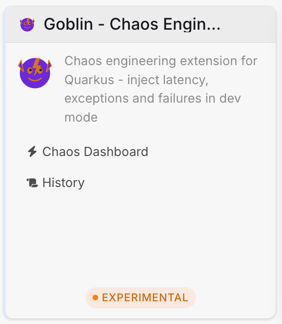
The Goblin card in the Dev UI extension grid.
Chaos Dashboard
The dashboard is the main control surface. It exposes the master toggle, per-type toggles, per-type configuration forms, and the target level.
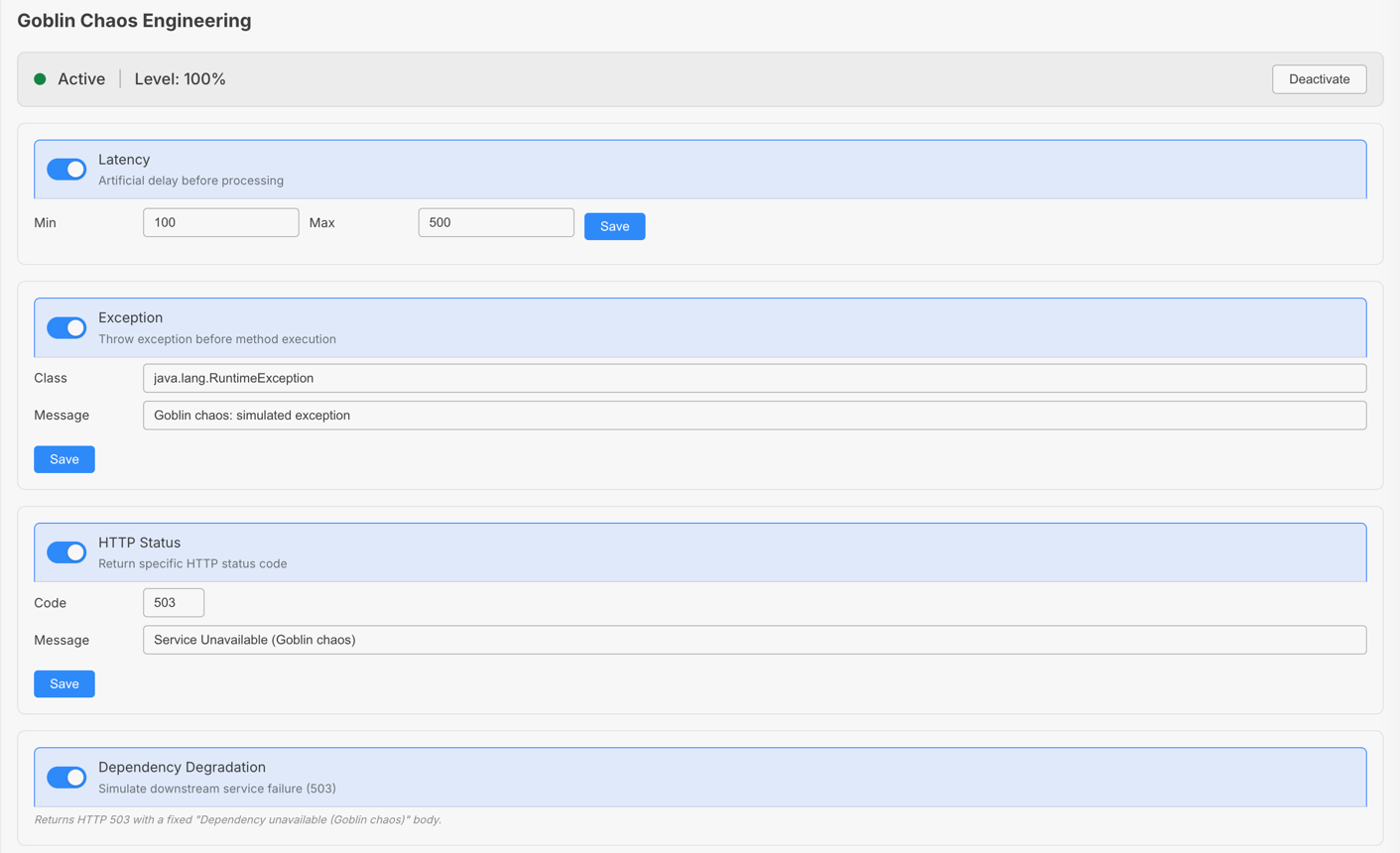
The Chaos Dashboard with latency enabled at 100% target level.
-
Master toggle — Activate/deactivate all chaos with a single click. When inactive, the status dot turns red and the
Deactivatebutton becomesActivate. -
Assault type toggles — Independent on/off switches for each assault type (Latency, Exception, HTTP Status, Dependency Degradation). Multiple types can be active simultaneously. Enabled types are highlighted with the Quarkus primary color.
-
Config sections — Each assault type has its own configuration section (latency range, exception class/message, HTTP status code/message). Sections are always visible but disabled with placeholder text when the type is off. Enable the type to edit its parameters. Every section has its own
Savebutton. -
Target level — Adjust the percentage of affected requests (0-100%) on the fly, saved with its own button.
-
All changes apply instantly — no restart needed. A WARN log is emitted in the console for every change, and a toast confirms each action in the UI. If a change violates a validation rule (see Configuration validation), the toast shows the applied correction, e.g. a swapped latency range.
| When chaos is deactivated, the configuration sections remain visible but are dimmed and their inputs disabled — you can prepare your assault configuration before turning chaos on. |
History
A real-time log of every assault triggered, including the endpoint method, assault type, timestamp, the actual applied latency duration (when the assault was a latency injection), and a snapshot of the active assault configuration at the time of the assault. Clear the history between test sessions.

The Assault History panel showing past triggered assaults.
The history is an in-memory buffer capped at the latest 1000 assaults. Use it to confirm that your targeting rules and level are applying to the expected endpoints before drawing conclusions about your resilience checks.
Markdown report export
The History panel also offers an Export Markdown button. Clicking it generates a factual Markdown report of the current Goblin session and displays it in a copyable panel:
-
the current status (active/inactive) and target level
-
the current assault configuration (latency, exception, HTTP status, dependency degradation toggles and values)
-
the full assault history, including the actual latency duration applied for each latency assault and a snapshot of the active configuration at the time of each assault — so a config change between two calls is clearly visible (e.g.
latency enabled (100 - 500 ms)vslatency enabled (1000 - 5000 ms))
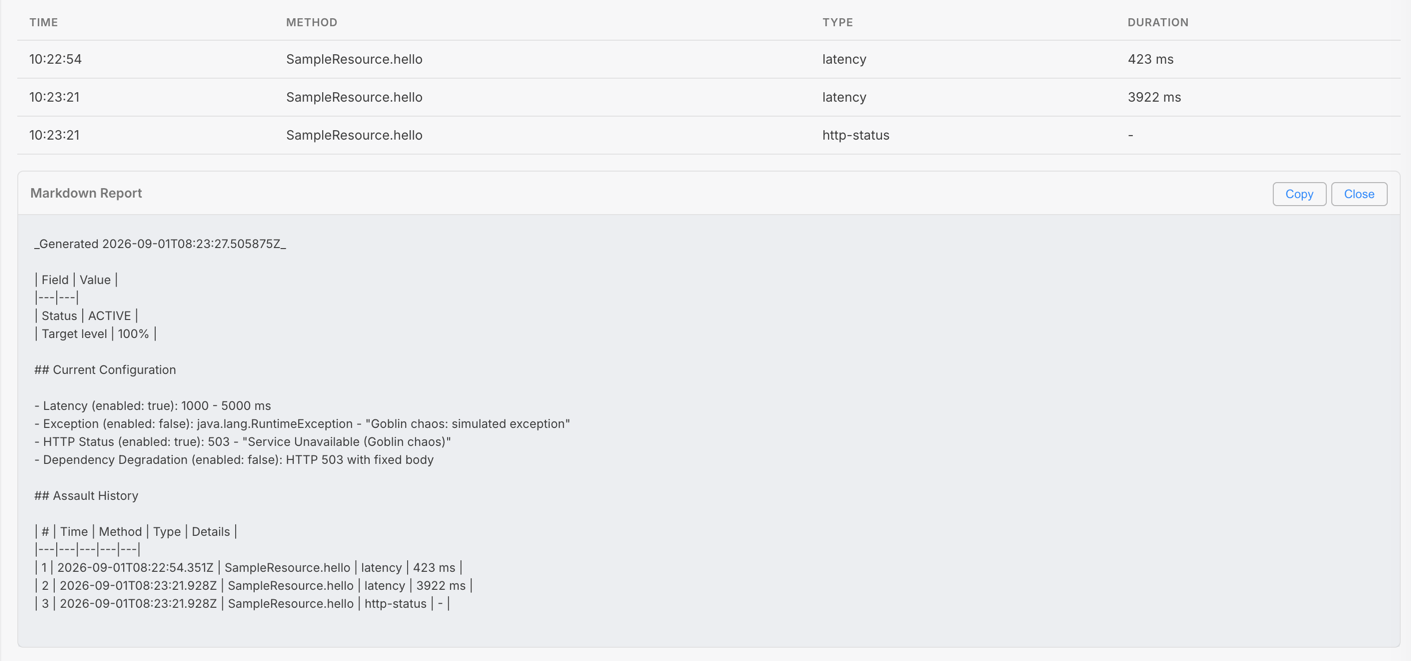
The exported Markdown report with the assault history table.
The report is intentionally factual: it records what Goblin observed (configuration and assault history), without judging your application’s resilience. This makes it directly usable as input for an LLM assistant tasked with reviewing and hardening your endpoints — the facts ("`GET /api/orders` was subject to a 4945 ms latency at 10:37 UTC") are there, the verdict is left to the reviewer.
How it works
Goblin operates at the JAX-RS filter layer using a ContainerRequestFilter:
-
At build time, the deployment module registers the filter and the
goblinfeature with Quarkus. -
At runtime startup, the
AssaultEngineis initialized: it first checks for a persisted state file (.goblin-state.json), then falls back to the configuration fromapplication.properties. In dev mode a change listener is registered so that every subsequent config mutation automatically persists the state to disk. -
For every incoming HTTP request, the filter checks:
-
Is chaos active?
-
Should this specific request be affected? (based on the
levelpercentage) -
Is the target endpoint eligible? (based on package/annotation filters)
-
-
If all conditions are met, all enabled assault types are applied in order: latency first (delay), then exception/HTTP-status/dependency-degradation (which abort the request).
-
An assault record is added to the history buffer (capped at 1000 entries).
The filter runs early in the JAX-RS pipeline, before any endpoint logic executes. This means:
-
Exception and HTTP_STATUS assaults completely bypass your endpoint code — no side effects, no partial state mutations.
-
Latency assaults add delay before processing, simulating network or upstream slowness.
Runtime config modification
All assault parameters can be modified at runtime through the Dev UI or via JSON-RPC. The initial config is loaded from application.properties at startup, then held in a mutable in-memory config (MutableAssaultConfig). This means you can:
-
Enable latency AND exception simultaneously to simulate a slow failure.
-
Toggle assault types on/off without restarting.
-
Change the latency range, exception class, or HTTP status code on the fly.
-
Drop the target level from 100% to 10% to test intermittent failures.
Changes take effect on the next request — no restart, no redeployment. A WARN log confirms every change in the console.
State persistence
Runtime config changes made through the Dev UI are automatically persisted to a .goblin-state.json file in the project working directory. On the next startup, Goblin checks for this file and restores the previous configuration instead of starting fresh from application.properties.
This means your chaos scenario survives restarts — no need to reconfigure the dashboard every time you restart in dev mode.
The persistence listener is only registered in dev mode, so integration or system tests never overwrite the chaos configuration you saved from the Dev UI.
Add .goblin-state.json to your .gitignore to avoid committing local chaos state to version control.
|
If the state file is corrupted or unreadable, Goblin logs a warning and falls back to the configuration from application.properties.
Adding your own assault type
Goblin ships with four built-in assault types and lets you register your own. Implement the io.quarkiverse.goblin.assault.Assault interface, annotate the class @ApplicationScoped, and it is discovered automatically at build time — no other wiring required:
-
type()— theAssaultTypethis assault represents. -
isEnabled(config)— whether the assault should run for the current mutable configuration. -
recordLabel()— the label used in the assault history and the Markdown report. -
order()— the execution position in the chain. Latency (order10) runs first; assaults that abort the request run afterwards. -
apply(context)— perform the assault. ReturnAssaultOutcome.CONTINUEto let the next enabled type run, orABORTEDto stop processing. To short-circuit the request callcontext.getRequestContext().abortWith(…); to throw a simulated failure, throw aRuntimeException.
At build time Goblin scans the application index for implementors of Assault and registers them as beans, so a custom type provided by your application is picked up automatically. The filter resolves the ordered list of assaults for every request and applies the enabled ones in order() sequence.
Compatibility
MicroProfile Fault Tolerance
Goblin is designed to coexist with Fault Tolerance annotations. The typical workflow:
-
Configure chaos on unprotected endpoints (default behavior).
-
Exclude fault-tolerant endpoints via
quarkus.goblin.target.exclude-annotations. -
Verify that the unprotected endpoints fail as expected.
-
Remove the exclusion, chaos-test the fault-tolerant endpoints to confirm
@Timeoutand@Fallbacktrigger correctly.
Troubleshooting
Chaos is not activating:
-
Verify you are running in dev mode (
quarkus:dev), not in test or production mode. -
Check that
quarkus.goblin.enabled=true(the default). -
Verify at least one assault type is enabled in the Dev UI.
-
Look for the WARN log at startup confirming chaos activation.
Previous config is not restored on restart:
-
Check that
.goblin-state.jsonexists in the project working directory. -
If the file is corrupted (e.g. manual edits), delete it and reconfigure via the Dev UI. Goblin will recreate it automatically.
-
Look for a WARN log:
Failed to load .goblin-state.json, falling back to application.properties.
Endpoints are returning 500:
-
If using EXCEPTION assault, verify the exception class exists and has a
Stringconstructor. -
Check the Quarkus dev console for stack traces.
Targeting filters not working:
-
Package matching uses
startsWith, socom.examplematchescom.example.apiandcom.example.internal. -
Annotation matching uses fully qualified class names, not simple names. Use
jakarta.ws.rs.GET, notGET.
Dev UI config changes not visible:
-
Check the Quarkus console for WARN logs confirming the change.
-
Changes are persisted to
.goblin-state.jsonand restored on restart. If the file is missing or corrupted, Goblin falls back toapplication.propertiesdefaults.
End-to-end example: prove your @Timeout works
This walkthrough exercises a realistic scenario: verifying that a MicroProfile @Timeout and @Fallback react correctly when a downstream call becomes slow.
-
Start the sample application in dev mode:
./mvnw -pl integration-tests quarkus:dev -
Configure a latency assault that exceeds your
@Timeoutthreshold. If the downstream endpoint has a@Timeout(1000)(1 second), set a latency range well above it:quarkus.goblin.enabled=true quarkus.goblin.assault.type=LATENCY quarkus.goblin.assault.latency.min-milliseconds=2000 quarkus.goblin.assault.latency.max-milliseconds=4000 quarkus.goblin.target.level=100 # Exclude other fault-tolerant endpoints so only the one under test is affected -
Open the Dev UI at
http://localhost:8080/q/devand confirm latency is enabled in the Chaos Dashboard. -
Call the endpoint under test and observe the response time and whether the fallback was invoked:
curl -w "\nstatus=%{http_code} time=%{time_total}s\n" http://localhost:8080/api/hello -
Check the Assault History panel to confirm the latency assault was recorded against the expected method.
-
Repeat with
quarkus.goblin.target.level=10to observe intermittent, non-deterministic failures — the hardest scenario to get right in production.
JSON-RPC reference
The Dev UI talks to the runtime through a JSON-RPC service (GoblinJsonRPCService). The same service is available over the Dev UI’s built-in JSON-RPC bridge, which is useful for scripting or CI validation. All methods read or mutate the in-memory MutableAssaultConfig.
| Method | Effect |
|---|---|
|
Returns |
|
Returns the full mutable config (toggles, latency range, exception config, HTTP status config, level). |
|
Enable/disable chaos entirely. Emits a WARN log. |
|
Flip the corresponding assault toggle on/off. |
|
Set the min/max latency range. |
|
Set the exception class name and message. |
|
Set the HTTP status code and response body. |
|
Set the percentage of affected requests (clamped to 0-100). |
|
Return the assault history buffer. Each entry exposes the method, type, timestamp, the applied latency duration ( |
|
Empty the assault history buffer. |
|
Return |
FAQ
Does Goblin run in production?
No. The chaos implementation is only activated in dev and test mode. The runtime ships in quarkus-goblin, while the Dev UI components live in the runtime-dev module (quarkus-goblin-dev), which is only attached in dev mode.
Do I need to annotate my endpoints?
No. Goblin intercepts at the JAX-RS filter level automatically. The only interface is configuration, either static (application.properties) or dynamic (Dev UI / JSON-RPC).
What is the maximum assault history size?
The history buffer is capped at the latest 1000 entries; the oldest are dropped automatically.
Can I combine latency and exception to simulate a slow failure?
Yes. Multiple assault types can be active on the same request. In that case the latency (delay) is applied first, then the exception is thrown — ideal for verifying that @Timeout triggers before @Fallback, or that a fallback handles an exception raised after a slow response.
What happens if my exception class cannot be constructed?
If the configured class does not exist or has no String constructor, Goblin falls back to a RuntimeException carrying the configured message. See the Troubleshooting section.
Are Dev UI changes persisted?
Yes. Runtime changes are automatically saved to a .goblin-state.json file in the project working directory and restored on the next startup. The file is gitignored by default.
Non-goals (out of scope for V1)
-
Infrastructure chaos (pod killing, network partitioning) — use Chaos Mesh, Litmus, or Pumba for that.
-
Production/staging chaos — may be explored in a future version with a completely different safety model (explicit opt-in, time-bounded windows, audit trail).
-
Native compilation — to be validated separately once the core mechanism is proven on JVM.