Quarkus Cucumber
This extension allows you to use Cucumber to test your Quarkus application.
Installation
If you want to use this extension, you need to add the io.quarkiverse.cucumber:quarkus-cucumber extension first.
In your pom.xml file, add:
<dependency>
    <groupId>io.quarkiverse.cucumber</groupId>
    <artifactId>quarkus-cucumber</artifactId>
    <version>1.3.0</version>
</dependency>
Usage
To bootstrap Cucumber add the following class to your test suite:
import io.quarkiverse.cucumber.CucumberQuarkusTest;

public class MyTest extends CucumberQuarkusTest {

}
This will automatically bootstrap Cucumber, and discover any .feature files and step classes that provide glue code.
ScenarioScope
The @ScenarioScope annotation allows you to define beans whose state is tied to the lifecycle of a Cucumber scenario. This means that the state of these beans will automatically reset between the execution of each scenario, without the need for manual cleanup.
This feature is particularly useful for managing stateful beans in Cucumber tests, similar to the mechanism provided by Spring, as described in the Cucumber documentation.
Example
The usage of @ScenarioScope is similar to other CDI scopes, such as @ApplicationScoped.
Here’s how you can define a @ScenarioScope bean and use it within your step definitions:
import io.quarkiverse.cucumber.ScenarioScope;
import jakarta.inject.Inject;

@ScenarioScope
public class MyStatefulBean {
    private String state;

    public String getState() {
        return state;
    }

    public void setState(String state) {
        this.state = state;
    }
}

public class MyStepDefinitions {

    @Inject
    MyStatefulBean myStatefulBean;

    @Given("I set the state to {string}")
    public void setState(String state) {
        myStatefulBean.setState(state);
    }
}
In this example, MyStatefulBean is injected into the step definition class, and each scenario will have its own instance of the bean. This ensures that the state is isolated across different scenarios.
Scenario Lifecycle Events
The extension fires CDI events at the start and end of each scenario, enabling Quarkus-native lifecycle management using the familiar @Observes pattern. This is useful for test setup/teardown, logging, resource management, and failure handling.
Available Qualifiers
-
@BeforeScenario- Fired when a scenario starts, before any steps execute -
@AfterScenario- Fired when a scenario finishes (regardless of pass/fail status)
ScenarioEvent API
The ScenarioEvent class provides access to scenario metadata:
| Method | Description |
|---|---|
|
The scenario name as defined in the feature file |
|
The URI of the feature file containing this scenario |
|
The line number of the scenario in the feature file |
|
Collection of tags (e.g., |
|
Execution status ( |
|
Convenience methods for checking the result |
|
Access to the underlying Cucumber |
Basic Example
import jakarta.enterprise.context.ApplicationScoped;
import jakarta.enterprise.event.Observes;
import io.quarkiverse.cucumber.BeforeScenario;
import io.quarkiverse.cucumber.AfterScenario;
import io.quarkiverse.cucumber.ScenarioEvent;

@ApplicationScoped
public class TestSetupObserver {

    public void onBeforeScenario(@Observes @BeforeScenario ScenarioEvent event) {
        System.out.println("Starting scenario: " + event.getName());
    }

    public void onAfterScenario(@Observes @AfterScenario ScenarioEvent event) {
        System.out.println("Finished scenario: " + event.getName() + " - " + event.getStatus());
    }
}
Use Case: Database Reset
Reset test data before each scenario to ensure test isolation:
@ApplicationScoped
public class DatabaseResetObserver {

    @Inject
    EntityManager em;

    @Transactional
    public void resetDatabase(@Observes @BeforeScenario ScenarioEvent event) {
        // Clear test data before each scenario
        em.createQuery("DELETE FROM Order").executeUpdate();
        em.createQuery("DELETE FROM Customer").executeUpdate();

        // Seed with baseline data
        em.persist(new Customer("test-user", "test@example.com"));
    }
}
Use Case: Conditional Setup by Tag
Execute setup only for scenarios with specific tags:
@ApplicationScoped
public class ConditionalSetupObserver {

    @Inject
    MockServerClient mockServer;

    public void setupMocks(@Observes @BeforeScenario ScenarioEvent event) {
        if (event.getTags().contains("@external-api")) {
            // Configure mock server only for scenarios that need it
            mockServer.when(request().withPath("/api/users"))
                      .respond(response().withBody("{\"id\": 1}"));
        }
    }

    public void cleanupMocks(@Observes @AfterScenario ScenarioEvent event) {
        if (event.getTags().contains("@external-api")) {
            mockServer.reset();
        }
    }
}
Use Case: Failure Logging and Screenshots
Capture additional diagnostics when a scenario fails:
@ApplicationScoped
public class FailureHandler {

    private static final Logger LOG = Logger.getLogger(FailureHandler.class);

    @Inject
    ScreenshotService screenshotService;

    public void handleFailure(@Observes @AfterScenario ScenarioEvent event) {
        if (event.isFailed()) {
            LOG.errorf("Scenario FAILED: %s (line %d in %s)",
                event.getName(), event.getLine(), event.getUri());

            // Capture screenshot for UI tests
            screenshotService.capture("failure-" + event.getName() + ".png");

            // Log additional context
            LOG.error("Tags: " + event.getTags());
        }
    }
}
Use Case: Test Metrics
Collect metrics for test execution analysis:
@ApplicationScoped
public class TestMetricsObserver {

    private final Map<String, Long> scenarioStartTimes = new ConcurrentHashMap<>();

    @Inject
    MeterRegistry registry;

    public void startTimer(@Observes @BeforeScenario ScenarioEvent event) {
        scenarioStartTimes.put(event.getName(), System.currentTimeMillis());
    }

    public void recordMetrics(@Observes @AfterScenario ScenarioEvent event) {
        Long startTime = scenarioStartTimes.remove(event.getName());
        if (startTime != null) {
            long duration = System.currentTimeMillis() - startTime;

            registry.timer("cucumber.scenario.duration",
                    "name", event.getName(),
                    "status", event.getStatus().toString())
                    .record(duration, TimeUnit.MILLISECONDS);
        }
    }
}
Combining with ScenarioScope
Lifecycle events work seamlessly with @ScenarioScope beans. The @BeforeScenario event fires before the scenario context is activated, and @AfterScenario fires before the context is destroyed:
@ScenarioScope
public class TestContext {
    private String authToken;
    // getters/setters
}

@ApplicationScoped
public class AuthSetupObserver {

    @Inject
    TestContext testContext;

    @Inject
    AuthService authService;

    public void setupAuth(@Observes @BeforeScenario ScenarioEvent event) {
        if (event.getTags().contains("@authenticated")) {
            String token = authService.login("test-user", "password");
            testContext.setAuthToken(token);
        }
    }
}
IDE Integration
The test class can by run by any IDE with support for JUnit5.
In IntelliJ it is possible to directly run feature files:
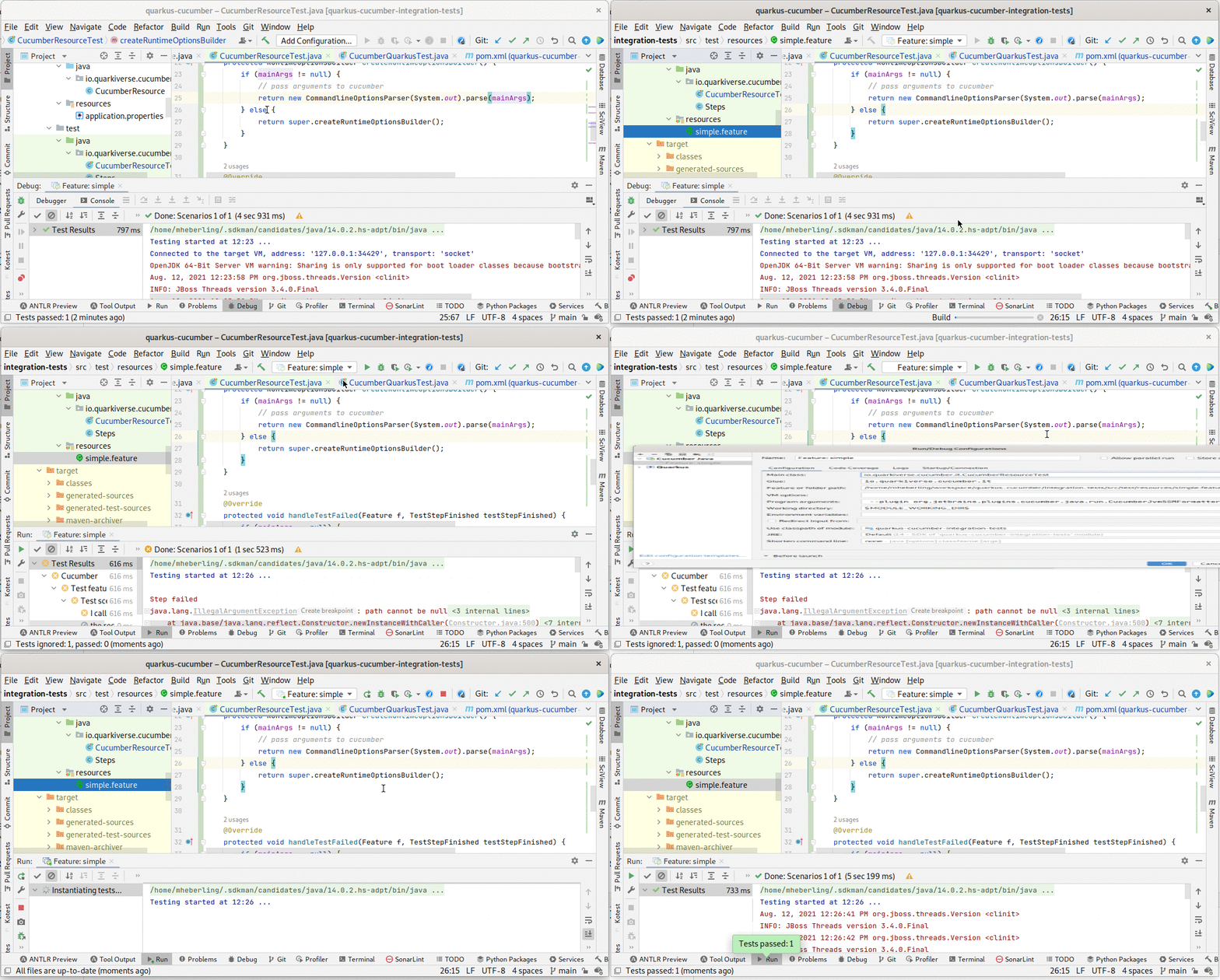
You need to add the following main method to your test class:
import io.quarkiverse.cucumber.CucumberQuarkusTest;

public class MyTest extends CucumberQuarkusTest {
    public static void main(String[] args) {
        runMain(MyTest.class, args);
    }
}