Quarkus Langfuse
A Quarkus extension for Langfuse, the open-source LLM engineering platform. This extension provides a type-safe REST client (based on the Langfuse Java SDK), DevServices for zero-config local development, and a Dev UI card for quick access to the Langfuse dashboard.
What is Langfuse?
Langfuse is an open-source LLM engineering platform that helps teams collaboratively debug, analyze, and iterate on their LLM applications. It provides:
-
Observability - Capture comprehensive traces covering LLM and non-LLM calls, including retrieval, embedding, API calls, and more. Track multi-turn conversations and multi-step agentic workflows with sessions. Surface quality, cost, and latency metrics at a glance.
-
Prompt management - Manage, version, and optimize prompts throughout development. Deploy prompts to production or other environments without any code changes. Compare latency, cost, and evaluation metrics across different versions.
-
Evaluation - Attach numeric, boolean, or categorical evaluation scores to traces. Create dataset collections for systematic testing. Run LLM-as-a-judge evaluations on production or development traces.
Features
This extension integrates Langfuse into the Quarkus ecosystem with the following features:
-
Type-safe Langfuse API client - Synchronous and asynchronous clients covering the full Langfuse public API (traces, prompts, scores, datasets, observations, skills, and more), built on the Quarkus REST Client Reactive.
-
Higher-level API operations - Curated
LangfuseOperationsandAsyncLangfuseOperationsbeans over seventeen domains, offering lookup by id or name, existence checks, filtered views, lazy pagination, idempotent initialization and batch deletes that report an outcome per identifier. See Higher-Level API Operations. -
CDI integration - Inject
LangfuseApidirectly into your beans. No Quarkus-specific types needed. -
DevServices - Automatically starts a complete Langfuse stack (Langfuse server, PostgreSQL, ClickHouse, Redis, MinIO, and Worker) in dev and test mode using Testcontainers. No manual setup required.
-
Dev UI - Provides a Dev UI card with a direct link to the Langfuse dashboard running in your local DevServices instance.
-
Native image support - Compatible with GraalVM native image compilation.
-
OpenTelemetry integration - When
quarkus-opentelemetryis on the classpath, automatically exports AI-related spans to Langfuse via OTLP. Zero configuration needed with DevServices.
Compatibility
Langfuse v4
This version of the extension requires Langfuse v4. If you are upgrading from a previous version of the extension that targeted Langfuse v3, complete the Langfuse v4 migration before upgrading the extension.
Quarkus
This version of the extension requires Quarkus 3.40 LTS or later. Applications still on Quarkus 3.33 LTS should stay on the 0.8.x releases of the extension (0.9.0 is the first release that requires Quarkus 3.40).
OpenAPI spec validation
The Langfuse v4 OpenAPI spec uses the const keyword (an OpenAPI 3.1 feature) while declaring version 3.0.1. The openapi-generator-maven-plugin cannot validate the spec with this incompatibility, so skipValidateSpec is set to true in the langfuse-client module’s POM. This does not affect code generation — only the upfront validation check is bypassed. This is tracked upstream as openapi-generator#10445.
Configuration
Configure your Langfuse connection in application.properties:
quarkus.langfuse.base-url=https://cloud.langfuse.com
quarkus.langfuse.public-key=pk-lf-...
quarkus.langfuse.private-key=sk-lf-...
When DevServices is enabled (the default in dev/test mode), base-url, public-key, and secret-key are automatically configured for you. You only need to set these properties when connecting to an external Langfuse instance or in production.
|
The public-key and secret-key properties correspond to the Langfuse project public key and project secret key, respectively. You can find these in the Langfuse dashboard under Settings > API Keys.
For a complete list of configuration properties, see the Extension Configuration Reference.
Usage
Simply inject LangfuseApi into your CDI beans for raw REST API access, or inject LangfuseOperations / AsyncLangfuseOperations for higher-level operations such as finding resources by id or name, checking existence, restricting a collection with a filter, deleting in batches, and walking paginated collections (see Higher-Level API Operations).
The extension automatically configures and provides the implementations:
import jakarta.enterprise.context.ApplicationScoped;
import jakarta.inject.Inject;

import com.langfuse.api.LangfuseApi;

@ApplicationScoped
public class MyService {

    @Inject
    LangfuseApi langfuseApi;

    public void listObservations() {
        // Synchronous call
        var observations = langfuseApi.observations().observationsGetMany(/* parameters */);

        // Asynchronous call
        var asyncObservations = langfuseApi.asyncObservations().observationsGetMany(/* parameters */);
    }

    public void listPrompts() {
        var prompts = langfuseApi.prompts().promptsList(/* parameters */);
    }

    public void listScores() {
        var scores = langfuseApi.scores().scoresGetMany(/* parameters */);
    }

    public void checkHealth() {
        var health = langfuseApi.health().healthHealth();
    }
}
Available API Groups
The LangfuseApi bean provides access to the full Langfuse public API. Each API group is available as a method, with both synchronous and asynchronous variants (e.g., trace() / asyncTrace()):
| API Group | Description |
|---|---|
|
Health check endpoints |
|
OpenTelemetry trace ingestion (recommended for v4) |
|
Query observations with selective fields and cursor pagination (v2) |
|
Create scores (batch, |
|
List experiments and experiment items (dataset runs) |
|
Manage, version, and retrieve prompts |
|
Manage individual prompt versions |
|
Manage score configurations |
|
Create and manage datasets |
|
Manage dataset items |
|
Create, upsert, and manage model definitions and pricing |
|
Create and manage evaluators (v2) |
|
Create and manage evaluation rules (v2) |
|
Manage projects and API keys |
|
Manage organization memberships |
|
Manage comments on traces |
|
Upload and manage media attachments |
|
Query usage metrics (v2) |
|
Manage annotation queues for human review |
|
Manage LLM provider connections (project scope) |
|
Manage blob storage integrations |
|
SCIM user provisioning |
|
Submit feedback about Langfuse features |
|
Create, list, update, and delete dashboard widgets (unstable) |
|
Create, list, update, and delete dashboards with placements (unstable) |
|
Manage skills, their versions, labels and file contents |
|
Trace delete endpoints (reads are unavailable in v4 events_only mode; use |
Example: Listing Prompts
import jakarta.enterprise.context.ApplicationScoped;
import jakarta.inject.Inject;

import com.langfuse.api.LangfuseApi;

@ApplicationScoped
public class PromptService {

    @Inject
    LangfuseApi langfuseApi;

    public void listAllPrompts() {
        var prompts = langfuseApi.prompts().promptsList(APIPromptsListRequest.newBuilder().build());

        prompts.getData().forEach(prompt ->
            System.out.println(prompt.getName() + " (v" + prompt.getVersion() + ")")
        );
    }
}
OpenTelemetry Integration
When the quarkus-opentelemetry extension is present in your project, the Langfuse extension automatically exports OpenTelemetry span data to Langfuse. No additional configuration is needed — the extension uses your existing quarkus.langfuse.public-key and quarkus.langfuse.secret-key for authentication.
Export Target
The quarkus.langfuse.otel.export-target property (build time) controls how spans are exported:
-
ALL(default) — The extension registers a dedicated Langfuse span processor that runs alongside any other OpenTelemetry exporters you have configured. Spans are exported to both Langfuse and your standard OTLP backend (Jaeger, Zipkin, or any other collector). In this mode, only AI-related spans are sent to Langfuse by default (see AI Span Filtering below), and thegen_ai.prompt/gen_ai.completionattributes are automatically mapped to the Langfuse trace input and output. -
LANGFUSE_ONLY— The standard OpenTelemetry OTLP exporter is configured to send directly to Langfuse. No separate span processor is registered and no additional OTLP backend receives spans. All spans are exported to Langfuse without filtering. This is equivalent to the manual configuration described in the Quarkus LangChain4j docs, but handled automatically by the extension.
quarkus.langfuse.otel.export-target=LANGFUSE_ONLYAI Span Filtering
When export-target=ALL (the default), only AI-related spans and their ancestor spans are exported to Langfuse. A span is considered AI-related if it carries any gen_ai.* OpenTelemetry Semantic Convention attributes (such as gen_ai.system, gen_ai.request.model, gen_ai.response.finish_reasons, etc.). Ancestor spans — the parent chain leading up to an AI span — are included to preserve trace structure.
This filtering prevents infrastructure noise (HTTP server spans, database queries, framework internals) from cluttering your Langfuse dashboard while still giving you full context around AI operations.
Additionally, the gen_ai.prompt and gen_ai.completion attributes are automatically mapped to the Langfuse trace input and output fields, so you get immediate visibility into what was sent to and received from the LLM.
To export all spans instead of only AI-related ones:
quarkus.langfuse.otel.span-filter=ALLQuarkus LangChain4j Integration
When both quarkus-opentelemetry and quarkus-langchain4j are on the classpath, the extension automatically enables LangChain4j prompt tracing by setting the following properties to true:
-
quarkus.langchain4j.tracing.include-prompt -
quarkus.langchain4j.tracing.include-completion -
quarkus.langchain4j.tracing.include-tool-arguments -
quarkus.langchain4j.tracing.include-tool-result
This means prompt content, LLM responses, tool arguments, and tool results are all included in the OpenTelemetry spans emitted by LangChain4j — and therefore visible in Langfuse traces — without any manual configuration.
These defaults are set at a low priority, so you can override any of them in application.properties or via environment variables if needed.
Example
With a simple AI Service
import jakarta.enterprise.context.ApplicationScoped;

import dev.langchain4j.service.SystemMessage;
import dev.langchain4j.service.UserMessage;

import io.quarkiverse.langchain4j.RegisterAiService;

@RegisterAiService
@ApplicationScoped
public interface ChatService {
    @SystemMessage("You are a helpful assistant.")
    String chat(@UserMessage String prompt);
}
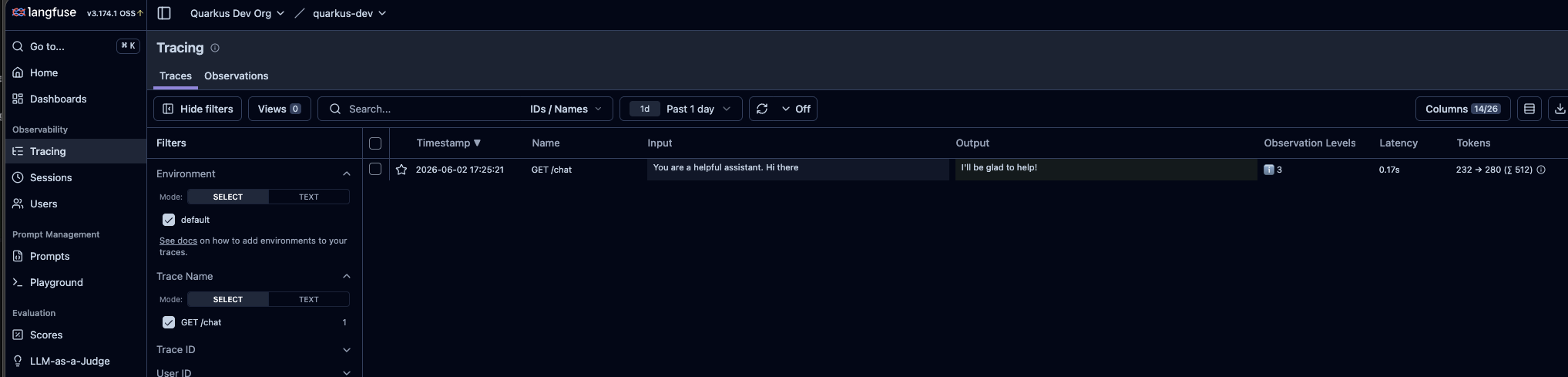
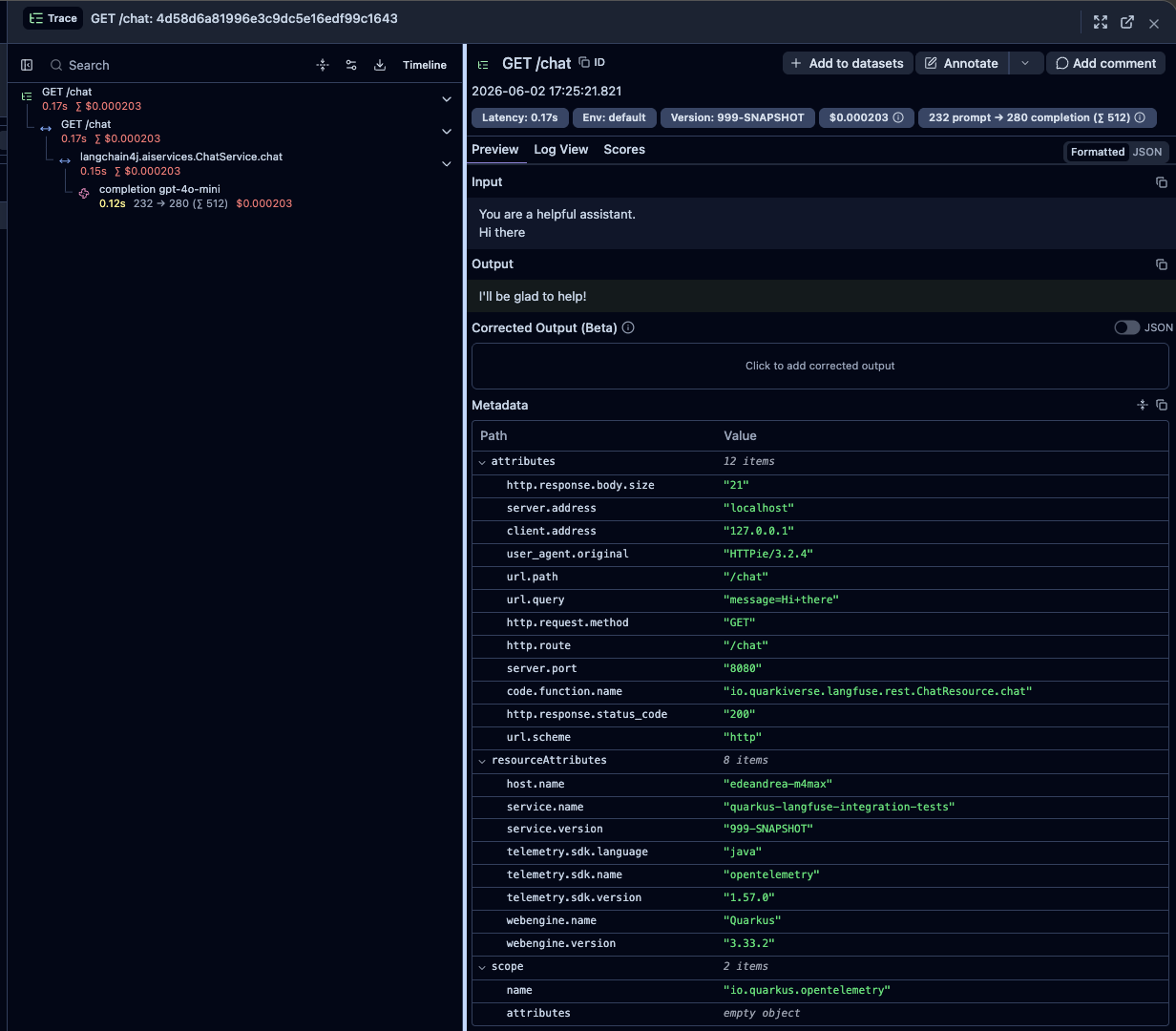
It will automatically send traces to Langfuse:
Zero-Config with DevServices
When DevServices is running, the OpenTelemetry integration works out of the box with no configuration at all. The Langfuse base URL, public key, and secret key are all provided automatically by DevServices, and the span processor uses those values to connect to the local Langfuse instance.
Disabling the Integration
To disable the automatic OpenTelemetry integration (for example, if you want to manage your own OTel exporters or send spans to a different backend):
quarkus.langfuse.otel.enabled=false
When quarkus-opentelemetry is not on the classpath, the integration is automatically skipped regardless of this setting.
|
For the full list of OpenTelemetry configuration properties, see the Extension Configuration Reference.
DevServices
In dev and test mode, the extension automatically starts a complete Langfuse stack using Testcontainers. This means you can start building and testing against Langfuse immediately with zero configuration - just add the extension and run:
mvn quarkus:devThe DevServices stack includes:
| Service | Purpose |
|---|---|
Langfuse server |
The main Langfuse application with web UI and API |
PostgreSQL |
Primary database for Langfuse data |
ClickHouse |
Analytics database for high-performance queries |
Redis |
Cache and queue management |
MinIO |
S3-compatible object storage for media and blobs |
Worker |
Background job processing |
The extension automatically configures the quarkus.langfuse.base-url, quarkus.langfuse.public-key, and quarkus.langfuse.secret-key properties to point to the DevServices instance.
Langfuse Server Version
The Langfuse server and worker images are pinned to the Langfuse release whose OpenAPI specification the client is generated from, so the DevServices server always serves the API the extension was built against. The extension moves both images to newer Langfuse releases only after its build, including the integration tests, passes against them.
To run a different Langfuse release, set one property. It applies to both the server and the worker, so they always stay on the same release:
quarkus.langfuse.devservices.langfuse.image-version=<version>To use a custom image instead, set quarkus.langfuse.devservices.langfuse.image-name and/or quarkus.langfuse.devservices.worker.image-name. An explicit image-name takes precedence over image-version for that container.
Container Sharing
By default, DevServices containers are shared across multiple Quarkus applications running on the same machine. This is useful when developing microservices that all connect to the same Langfuse instance. Sharing uses label-based container discovery with the quarkus-dev-service-langfuse label.
To disable sharing or use separate containers per application:
quarkus.langfuse.devservices.shared=falseDevServices can be customized under the quarkus.langfuse.devservices prefix. DevServices automatically creates an organization, project, and user for local development. Each infrastructure service (PostgreSQL, ClickHouse, Redis, MinIO, Worker) can also be customized with its own image name, credentials, and container environment variables. For a complete list of DevServices configuration properties, see the Extension Configuration Reference.
Dev UI
When running in dev mode (quarkus dev), the extension adds a Langfuse card to the Quarkus Dev UI (available at http://localhost:8080/q/dev-ui). The card provides a direct link to the Langfuse web dashboard running in your DevServices container.
From the Langfuse dashboard you can:
-
Browse and inspect traces and their nested spans/generations
-
Manage and version prompts
-
View sessions for multi-turn conversation tracking
-
Review scores and evaluation results
-
Create and run datasets for systematic testing
-
Monitor cost, latency, and quality metrics
The default credentials for logging into the DevServices Langfuse UI are:
-
Email:
quarkus@quarkus.io -
secret-key:
quarkuslangfuse
Debugging and Logging
Enable request and response logging for troubleshooting:
quarkus.langfuse.log-requests=true
quarkus.langfuse.log-responses=true
quarkus.langfuse.pretty-print=true
This logs all HTTP requests and responses exchanged with the Langfuse server. Authorization headers are automatically masked in the logs for security.
Extension Configuration Reference
Configuration property fixed at build time - All other configuration properties are overridable at runtime
Configuration property |
Type |
Default |
|---|---|---|
If DevServices has been explicitly enabled or disabled. DevServices are generally enabled by default, unless there is an existing configuration present. When DevServices is enabled, Quarkus will attempt to automatically configure and start a Langfuse server when running in Dev or Test mode. Environment variable: |
boolean |
|
Indicates if the Langfuse server managed by Quarkus Dev Services is shared. When shared, Quarkus looks for running containers using label-based service discovery. If a matching container is found, it is used, and so a second one is not started. Otherwise, Dev Services for Langfuse starts a new container. The discovery uses the Container sharing is only used in dev mode. Environment variable: |
boolean |
|
The value of the This property is used when you need multiple shared Langfuse servers. Environment variable: |
string |
|
The Langfuse release to run, shared by the Langfuse web server and the Langfuse worker. Both containers must run the same release, so this is the only property needed to move them. It is used by the default value of The default is the release whose OpenAPI specification the client was generated from. Environment variable: |
string |
|
The container image name to use for the Langfuse web server. Defaults to the official image at the release set by Environment variable: |
string |
|
The port the Langfuse web server listens on inside the container. Environment variable: |
int |
|
The publicKey used for authentication with the Langfuse API. This maps to the Langfuse project public key used to initialize the dev instance. Environment variable: |
string |
|
The secretKey used for authentication with the Langfuse API. This maps to the Langfuse project secret key used to initialize the dev instance. Environment variable: |
string |
|
Maximum duration to wait for the Langfuse container to start up. Environment variable: |
|
|
The organization ID to initialize in the Langfuse instance. Environment variable: |
string |
|
The organization name to initialize in the Langfuse instance. Environment variable: |
string |
|
The project ID to initialize in the Langfuse instance. Environment variable: |
string |
|
The project name to initialize in the Langfuse instance. Environment variable: |
string |
|
The user email to initialize in the Langfuse instance. Environment variable: |
string |
|
The user name to initialize in the Langfuse instance. Environment variable: |
string |
|
The user secretKey to initialize in the Langfuse instance. Environment variable: |
string |
|
Whether to enable experimental features in Langfuse. Environment variable: |
boolean |
|
Whether to enable batch export in Langfuse. Environment variable: |
boolean |
|
The delay between ingestion queue processing cycles. Environment variable: |
||
The interval between ClickHouse write flushes for ingested events. Environment variable: |
||
The email "from" address for Langfuse email notifications. Environment variable: |
string |
|
The SMTP connection URL for Langfuse email notifications. Environment variable: |
string |
|
Environment variables that are passed to the Langfuse web server container. Environment variable: |
Map<String,String> |
|
The container image name to use for the PostgreSQL database. Environment variable: |
string |
|
The database publicKey. Environment variable: |
string |
|
The database secretKey. Environment variable: |
string |
|
The database name. Environment variable: |
string |
|
Environment variables that are passed to the PostgreSQL container. Environment variable: |
Map<String,String> |
|
The container image name to use for the ClickHouse analytics database. Environment variable: |
string |
|
The database publicKey. Environment variable: |
string |
|
The database secretKey. Environment variable: |
string |
|
The database name. Environment variable: |
string |
|
Environment variables that are passed to the ClickHouse container. Environment variable: |
Map<String,String> |
|
The container image name to use for the Redis cache. Environment variable: |
string |
|
The Redis secretKey. Environment variable: |
string |
|
Whether TLS is enabled for the Redis connection. Environment variable: |
boolean |
|
Environment variables that are passed to the Redis container. Environment variable: |
Map<String,String> |
|
The container image name to use for the MinIO object storage. Environment variable: |
string |
|
The MinIO root user. Environment variable: |
string |
|
The MinIO root secretKey. Environment variable: |
string |
|
The name of the S3 bucket to create. Environment variable: |
string |
|
Environment variables that are passed to the MinIO container. Environment variable: |
Map<String,String> |
|
The container image name to use for the Langfuse worker. Defaults to the official worker image at the release set by Environment variable: |
string |
|
Environment variables that are passed to the Langfuse worker container. Environment variable: |
Map<String,String> |
|
Whether to automatically configure the OpenTelemetry OTLP exporter to send traces to Langfuse when the Defaults to the value of Environment variable: |
boolean |
|
Specifies the target destination for exporting telemetry data in the OpenTelemetry integration configuration. The default value is "ALL", which directs telemetry data to both the regular OTLP-configured target and Langfuse. Environment variable: |
|
|
The base URL of the Langfuse server Environment variable: |
string |
required |
Langfuse project public key, used for API authentication. Found in the Langfuse dashboard under Settings > API Keys. Environment variable: |
string |
required |
Langfuse project secret key, used for API authentication. Found in the Langfuse dashboard under Settings > API Keys. Environment variable: |
string |
required |
Timeout for Langfuse calls Environment variable: |
|
|
Whether the Langfuse client should log requests Environment variable: |
boolean |
|
Whether the Langfuse client should log responses Environment variable: |
boolean |
|
Controls whether request/response bodies are pretty-printed if Environment variable: |
boolean |
|
Timeout to establish a connection to Langfuse. Defaults to Environment variable: |
|
|
Timeout for receiving a response from the Langfuse. Defaults to Environment variable: |
|
|
Retrieves the configured environment for the Langfuse client. This setting is used to determine the operational environment in which the Langfuse client is running. Environment variable: |
string |
|
The path used for ingesting traces in the OpenTelemetry integration for Langfuse, relative to the base URL. Environment variable: |
string |
|
The full URL used for ingesting traces in the OpenTelemetry integration for Langfuse. The URL points to the endpoint where trace data is exported. Environment variable: |
string |
|
Retrieves the configured span filter type used for OpenTelemetry integration within Langfuse. The span filter determines which spans are included based on their context or relevance to specific operations, such as AI-related activities. Environment variable: |
|
|
Default number of items requested per page when traversing a page-addressed collection, such as models, datasets, LLM connections or score configs. Langfuse caps this per endpoint (most allow at most Environment variable: |
int |
|
Default number of items requested per batch when traversing a cursor-addressed collection, such as evaluation rules. Langfuse caps this per endpoint (most allow at most Environment variable: |
int |
|
Maximum number of deletes a single batch delete operation runs at once. Langfuse has no bulk delete endpoint, so A value of This setting changes only timing and the order requests interleave. The outcome reported for every identifier is identical at any value, and validation, deduplication and the deleted/not-found/failed contract are unaffected by it. Environment variable: |
int |
|
|
About the Duration format
To write duration values, use the standard You can also use a simplified format, starting with a number:
In other cases, the simplified format is translated to the
|