Quarkus Messaging Outbox
The Quarkus Messaging Outbox extension adds an OutboxEmitter<T> that stores outgoing messages in the caller’s database transaction and relays them to the channel’s connector until the broker acknowledges them. It implements the transactional outbox pattern with at-least-once delivery, so no message is lost when a transaction commits and no message is sent when it rolls back.
|
This extension is experimental. Its API and configuration are subject to change. |
Installation
Import the BOM and add the core extension. The store, mapper, and connector extensions are automatically activated when their corresponding Quarkus extensions are present on the classpath.
<dependencyManagement>
    <dependencies>
        <dependency>
            <groupId>io.quarkiverse.messaging-outbox</groupId>
            <artifactId>quarkus-messaging-outbox-bom</artifactId>
            <version>0</version>
            <type>pom</type>
            <scope>import</scope>
        </dependency>
    </dependencies>
</dependencyManagement>

<dependencies>
    <dependency>
        <groupId>io.quarkiverse.messaging-outbox</groupId>
        <artifactId>quarkus-messaging-outbox</artifactId>
    </dependency>
</dependencies>
That’s it. The following extensions activate automatically:
| Extension | Activates when present |
|---|---|
Hibernate ORM store |
|
Hibernate Reactive store |
|
Jackson mapper |
|
Kafka connector |
|
AMQP connector |
|
RabbitMQ connector |
|
For example, a Kafka application with Hibernate ORM only needs:
<dependency>
    <groupId>io.quarkiverse.messaging-outbox</groupId>
    <artifactId>quarkus-messaging-outbox</artifactId>
</dependency>
<!-- Your existing Quarkus dependencies -->
<dependency>
    <groupId>io.quarkus</groupId>
    <artifactId>quarkus-hibernate-orm</artifactId>
</dependency>
<dependency>
    <groupId>io.quarkus</groupId>
    <artifactId>quarkus-messaging-kafka</artifactId>
</dependency>
<dependency>
    <groupId>io.quarkus</groupId>
    <artifactId>quarkus-jackson</artifactId>
</dependency>
Quick start
Inject OutboxEmitter<T> on an outgoing channel. The channel keeps its normal connector configuration.
import jakarta.enterprise.context.ApplicationScoped;
import jakarta.inject.Inject;
import jakarta.transaction.Transactional;

import org.eclipse.microprofile.reactive.messaging.Channel;

import io.quarkiverse.messaging.outbox.OutboxEmitter;

@ApplicationScoped
public class CustomerService {

    @Inject
    @Channel("customer-events")
    OutboxEmitter<CustomerCreated> events;

    @Transactional
    public void create(Customer customer) {
        customer.persist();
        events.sendAndAwait(new CustomerCreated(customer.id));
    }
}
Configure the channel as usual in application.properties:
mp.messaging.outgoing.customer-events.connector=smallrye-kafka
mp.messaging.outgoing.customer-events.topic=customer-events
The outbox tables are created on startup when quarkus.hibernate-orm.schema-management.strategy is drop-and-create or update. In production, create them with your migration tool, see Database schema.
Transactional Outbox & Message Relay
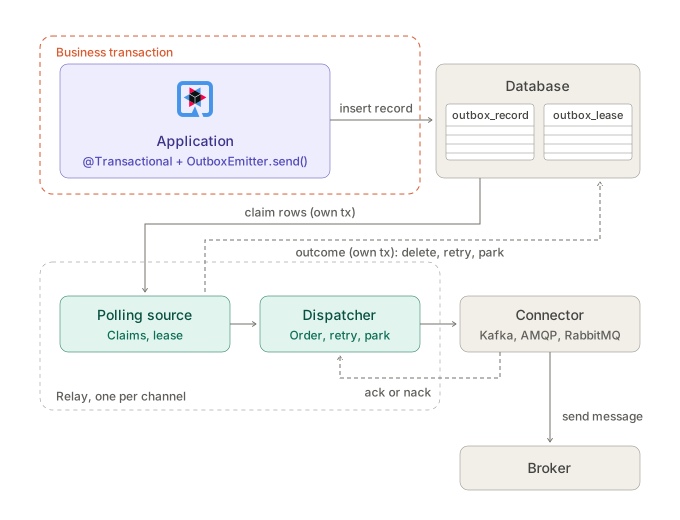
-
The application calls
OutboxEmitter.send()in its transaction. The outbox record is inserted next to the application’s entities: both commit, or neither does. -
After the commit, the polling source claims the record, in a short transaction of its own. With Hibernate ORM it is signalled at commit; otherwise it finds the record at its next poll.
-
The dispatcher orders the record within its channel or key, turns it into a message, and hands it to the connector.
-
The connector sends the message to the broker. This send is outside every database transaction.
-
The broker’s ack or nack comes back to the dispatcher.
-
The polling source records the outcome, in another short transaction: the record is deleted (or marked sent), scheduled for a retry, or parked.
If the application stops between steps 4 and 6, the record is still pending and is sent again: delivery is at least once, and consumers deduplicate on the outbox ID.
|
The relay can also read the transaction log instead of polling (see Relaying from the transaction log with Debezium), or be replaced entirely by an external CDC pipeline (see Using an external Debezium CDC relay). |
Transactional mode (default)
-
send()persists the message as a record in the outbox table, inside the caller’s transaction. -
The
Unireturned bysend()completes when the record is written, not when the broker acknowledges it.sendAndAwait()blocks until the write is done. -
After the transaction commits, the relay is signaled to claim and deliver the record.
-
The relay sends the record to the connector. On broker ack, the record is deleted (or marked as sent if
retention=keep). On nack, the record is retried with exponential backoff.
If the transaction rolls back, the outbox record is never visible and nothing is sent.
Fallback mode
In fallback mode (outbox.mode=fallback), the emitter sends directly to the broker first. Only if the direct send is nacked or times out does it store the record in the outbox table for later delivery by the relay.
mp.messaging.outgoing.customer-events.outbox.mode=fallbackFallback mode defaults ordering to none and require-transaction to false. An explicit ordered setting with fallback mode fails at startup.
Fallback mode provides lower latency in the happy path but weaker guarantees: a crash between a failed send and the fallback write can lose the message.
Sending
Message Key
The key identifies the entity whose records must stay in order. It is resolved in this order:
-
The
keyargument ofsend(key, payload), orOutboxMetadata.withKey(…)on a message. -
A String key from connector metadata:
OutgoingKafkaRecordMetadata.getKey()orOutgoingAmqpMetadata.getGroupId(). -
A
KeyValueExtractorbean selected for the channel. -
No key. Under
ordering=key, keyless records are unordered.
The outbox ordering key is always a String (stored as varchar in the database). Non-string Kafka keys are converted to their string form for ordering and restored to their original type on the outgoing record.
Configure a named extractor per channel:
mp.messaging.outgoing.customer-events.outbox.key-extractor=CustomerEventKeyExtractorThe key is passed to the broker as the Kafka record key, the AMQP group id, or the RabbitMQ routing key. Non-string Kafka keys (e.g., Integer, Long, UUID) are preserved: the original type is stored in the outbox headers and restored on the outgoing Kafka record.
Outbox ID
Every record has a UUID, the outbox ID. It stays the same across retries and redeliveries, so consumers can deduplicate on it.
The id reaches consumers as a broker-level header:
| Connector | Where the outbox ID appears |
|---|---|
Kafka |
|
AMQP |
|
RabbitMQ |
|
For example, a Kafka consumer reads it from the record headers:
@Incoming("customer-events-in")
public void consume(CustomerCreated event, IncomingKafkaRecordMetadata<String, ?> metadata) {
    Header header = metadata.getHeaders().lastHeader("outbox-id");
    UUID outboxId = UUID.fromString(new String(header.value(), StandardCharsets.UTF_8));
}
The message the relay sends also carries an OutboxMetadata with the outbox ID and the attempt number. It is on the outgoing message only, so outgoing interceptors can read it, but it does not cross the broker: consumers see the header.
Replacing MutinyEmitter or Emitter
OutboxEmitter has the same send methods as MutinyEmitter, and connector-specific metadata set on the message survives the outbox round-trip.
Emitter |
OutboxEmitter / MutinyEmitter |
|
|---|---|---|
|
Sends immediately (eager). Returns |
Returns a |
|
not available |
Subscribes the |
When replacing Emitter with OutboxEmitter:
-
In blocking code (e.g., a
@Transactionalmethod with Hibernate ORM), replaceemitter.send(payload)withemitter.sendAndAwait(payload). Callingsendwithout subscribing the returnedUnistores nothing, and the message is silently lost. -
In reactive code, chain or return the
Uni:return emitter.send(payload).
Connector-specific metadata set on the message survives the outbox round-trip:
-
Kafka: record headers, timestamp, partition, and topic from
OutgoingKafkaRecordMetadataare stored and restored. -
AMQP: content-type, subject, correlation-id, reply-to, TTL, priority, durability, and application properties from
OutgoingAmqpMetadataare stored and restored. -
RabbitMQ: routing key, exchange, content-type, correlation-id, headers, priority, delivery mode, and other properties from
OutgoingRabbitMQMetadataare stored and restored.
var kafkaMeta = OutgoingKafkaRecordMetadata.builder()
        .withHeaders(List.of(new RecordHeader("correlation-id", id.getBytes())))
        .withKey("customer-42")
        .build();
emitter.sendMessageAndAwait(Message.of(event, Metadata.of(kafkaMeta)));
The Kafka headers and key survive the outbox table and arrive on the consumer.
Relay
Ordering
The outbox.ordering setting controls how the relay delivers records.
strict (default)
One record at a time per channel, in sequence order. The relay claims a batch, emits the first record, waits for its ack, then emits the next. A nack retries the failing record in place; records behind it wait.
Retries
A nacked record is scheduled for retry after min(backoff.max, backoff.initial * 2^(attempts - 1)), plus up to 20% random jitter. With the defaults, the retries come after about 1s, 2s, 4s and so on, up to 1 minute.
-
In
strictandkeymodes, the failing record keeps its place and records behind it wait. -
After
max-attemptsthe record is parked asFAILEDand its queue moves on. The default-1retries forever. -
Parked records stay in the table with status
2and the start of the last error inlast_error.
To send parked records again, set them back to pending:
update outbox_record
   set status = 0, attempts = 0, next_attempt_at = null, claimed_by = null, claimed_until = null
 where status = 2 and channel = 'customer-events';
The relay picks them up at its next poll. In strict and key modes they keep their original place in the order, so they are sent before the records that are still waiting behind them.
Retention
By default (retention.mode=delete), delivered records are deleted immediately. Set retention.mode=keep to mark them as SENT instead. A periodic purge job removes sent records older than retention.period.
mp.messaging.outgoing.customer-events.outbox.retention.mode=keep
mp.messaging.outgoing.customer-events.outbox.retention.period=7d
mp.messaging.outgoing.customer-events.outbox.retention.purge-interval=1h
Claims and leases
Two separate mechanisms coordinate relays that share a database.
Claims are per-record: "I’m working on this row, don’t touch it until I’m done." When the relay claims a batch, it sets claimed_by and claimed_until on each row. The claim query uses SELECT … FOR UPDATE SKIP LOCKED, so two relays claiming at the same time lock disjoint rows without waiting. A claimed record is invisible to other relays until claimed_until passes. The relay renews the claims on its held records every lease-duration / 3. If the relay dies, its claims expire after lease-duration and another relay picks the records up. Claims work under all ordering modes.
The channel lease is per-channel: "I’m the relay for this channel, nobody else should claim." It exists only under strict and key ordering, where a single relay must process the channel to preserve order. The outbox_lease table holds one row per channel, naming the owner and its expiry. Acquisition is atomic: a conditional UPDATE succeeds only if the caller already owns the lease or the lease has expired. A standby instance retries every lease-duration / 3. When a new relay takes over, it clears all existing claims on the channel in the same transaction, so that records left by the previous holder are claimed again in order. Under none ordering, no channel lease is used — instances work in parallel with skip-locked claims only.
Multiple instances
-
Unordered channels (
ordering=none) scale out: each instance claims disjoint batches via skip-locked. -
Ordered channels (
strictorkey) run one relay at a time, elected through the channel lease. Other instances retry the lease everylease-duration / 3and take over when it expires.
Shutdown
On application shutdown, the relay stops claiming new records, waits for in-flight acks to complete, releases any remaining claimed records, and gives up its channel lease. Released records are picked up by another instance or on restart.
The wait is bounded at 10 seconds for all channels together. If acks are still missing then, the relay stops without releasing: its claims and lease expire after lease-duration, and another instance takes over.
Stores
Hibernate ORM
The default store for applications with quarkus-hibernate-orm and JTA. The outbox record is written with the caller’s Session, inside the caller’s JTA transaction. The relay operations use a StatelessSession in short transactions of their own.
The store requires an active transaction by default. Without one, send fails with No active transaction. Set outbox.require-transaction=false to let the store write in its own transaction (this is the default in fallback mode).
Hibernate Reactive
With the Hibernate Reactive store, send writes the record with the session of the caller’s transaction. A transaction must be active, in one of these forms:
-
sf.withTransaction(…)or Panache’s@WithTransaction -
@Transactionalfrom thequarkus-reactive-transactionsextension, with an injectedMutiny.Session
import jakarta.inject.Inject;

import org.eclipse.microprofile.reactive.messaging.Channel;
import org.hibernate.reactive.mutiny.Mutiny;

import io.quarkiverse.messaging.outbox.OutboxEmitter;
import io.smallrye.mutiny.Uni;

// ...

@Inject
Mutiny.SessionFactory sf;

@Inject
@Channel("customer-events")
OutboxEmitter<CustomerCreated> events;

public Uni<Void> create(Customer customer) {
    return sf.withTransaction(session -> session.persist(customer)
            .chain(() -> events.send(new CustomerCreated(customer.name))));
}
Without a transaction, send fails with No active transaction, unless require-transaction=false.
|
Database schema
The extension uses two tables in the persistence unit of the outbox entities. The schema uses no database-specific types and works with any database Hibernate supports.
-
outbox_recordholds the records waiting to be relayed. -
outbox_leaseholds one row per ordered channel, naming the relay that currently delivers it.
With drop-and-create or update, Hibernate ORM creates them for you. Applications that manage their schema with Flyway or Liquibase, or that run with validate, must create them. The scripts below match what Hibernate ORM expects, and the test suite applies them with Flyway and validates the result on each database.
If you set quarkus.messaging-outbox.table-name or quarkus.messaging-outbox.lease-table-name, rename the tables in the script.
-- Quarkus Messaging Outbox schema for PostgreSQL.
-- Matches what Hibernate ORM generates for the outbox entities, and passes schema validation.
-- With quarkus.messaging-outbox.table-name or lease-table-name set, rename the tables to match.

create table outbox_record (
    seq             bigint generated by default as identity,
    outbox_id       uuid not null,
    channel         varchar(255) not null,
    msg_key         varchar(255),
    payload         bytea,
    payload_type    varchar(255),
    headers         text,
    status          integer not null,
    attempts        integer not null,
    next_attempt_at timestamp(6) with time zone,
    claimed_by      varchar(255),
    claimed_until   timestamp(6) with time zone,
    created_at      timestamp(6) with time zone not null,
    last_error      varchar(1000),
    primary key (seq),
    constraint uk_outbox_record_outbox_id unique (outbox_id)
);

create index idx_outbox_claim on outbox_record (channel, status, next_attempt_at, seq);

create table outbox_lease (
    channel    varchar(255) not null,
    owner      varchar(255) not null,
    expires_at timestamp(6) with time zone not null,
    primary key (channel)
);-- Quarkus Messaging Outbox schema for MySQL 8.4 and later (InnoDB).
-- Matches what Hibernate ORM generates for the outbox entities, and passes schema validation.
-- With quarkus.messaging-outbox.table-name or lease-table-name set, rename the tables to match.
create table outbox_record (
seq bigint not null auto_increment,
outbox_id binary(16) not null,
channel varchar(255) not null,
msg_key varchar(255),
payload longblob,
payload_type varchar(255),
headers longtext,
status integer not null,
attempts integer not null,
next_attempt_at datetime(6),
claimed_by varchar(255),
claimed_until datetime(6),
created_at datetime(6) not null,
last_error varchar(1000),
primary key (seq),
constraint uk_outbox_record_outbox_id unique (outbox_id)
) engine = InnoDB;
create index idx_outbox_claim on outbox_record (channel, status, next_attempt_at, seq);
create table outbox_lease (
channel varchar(255) not null,
owner varchar(255) not null,
expires_at datetime(6) not null,
primary key (channel)
) engine = InnoDB;The Hibernate Reactive store uses the same tables. Flyway and Liquibase need a JDBC datasource next to the reactive one.
For another database, let Hibernate ORM write the script for your dialect, then copy the outbox tables into a migration:
quarkus.hibernate-orm.scripts.generation=create
quarkus.hibernate-orm.scripts.generation.create-target=create.sql
A few columns limit what you can send:
-
channel,msg_keyandpayload_typehold up to 255 characters. A longer key or channel name makessendfail. -
last_errorholds the first 1000 characters of the last failure message.
Guarantees and limits
What is guaranteed
-
At-least-once delivery. Every committed record reaches the broker at least once.
-
Atomicity. A rolled-back transaction produces no message.
-
Ordering. In
strictandkeymodes, records are delivered inseqorder within their scope. See the commit-order limit below.
What is not guaranteed
-
Exactly-once delivery. A crash after the broker ack but before the record is deleted produces a duplicate. Consumers can deduplicate on the outbox ID, available as
OutboxMetadata.getId()on the message and as theoutbox-idheader on Kafka records. For AMQP and RabbitMQ, the outbox ID is also set as the message id when the application did not set one. -
Commit order, with the polling relay. Records are ordered by
seq, which the database assigns when the row is inserted, not when the transaction commits. If two transactions write records for the same channel (or the same key) and the first one to insert commits last, the relay can send the second record first: it is the only one visible when the relay claims. Records written by one transaction, or by transactions that do not overlap, keep their order. If two writers can overlap and their order matters, serialize them in the application, for example with a lock on the entity both transactions update, or relay from the transaction log with Debezium (see Relaying from the transaction log with Debezium). -
No reordering after failover. When the lease holder dies and another instance takes over, the stale holder’s in-flight message may be sent again, producing a duplicate. Reordering is not possible once the stale holder stops.
Failure matrix
| Failure | Outcome |
|---|---|
Business transaction rolls back after |
The row is never visible. Nothing is sent. |
Crash after commit, before the relay wakes |
The poll timer of any instance finds the record. |
Broker unreachable |
Records are nacked or time out, then retried with backoff. |
Crash after the broker ack, before the delete |
The record is sent again with the same outbox ID. |
Relay instance dies with claimed records |
Claims expire after |
Connector never acks or nacks |
The record stays in flight: the relay keeps renewing its claim, and there is no ack timeout. In |
Database unreachable |
|
Payload cannot be serialized |
|
Stored payload cannot be deserialized by the relay, for example after an incompatible class change |
The record is parked as |
Relaying from the transaction log with Debezium
By default the relay polls the outbox table. The quarkus-messaging-outbox-debezium extension reads the database’s transaction log instead, with the Debezium embedded engine running in the application. No Kafka Connect is needed. It supports any database with a Debezium connector.
Add the extension and the Debezium connector of your database, debezium-connector-postgres or debezium-connector-mysql:
<dependency>
    <groupId>io.quarkiverse.messaging-outbox</groupId>
    <artifactId>quarkus-messaging-outbox-debezium</artifactId>
    <version>0</version>
</dependency>
<dependency>
    <groupId>io.debezium</groupId>
    <artifactId>debezium-connector-postgres</artifactId>
    <version>3.7.0.Final</version>
</dependency>
Without the connector, the application fails at startup with a message naming the artifact to add.
mp.messaging.outgoing.customer-events.outbox.relay.source=debeziumWhat changes:
-
Commit order. Records reach the relay in the order their transactions committed, which closes the overlapping-transaction limit of the polling relay. This holds for records committed while the engine streams; see the snapshot limit below.
-
Latency. A record is seen as soon as its transaction commits, with both stores. The reactive store’s
signal-delayno longer matters. -
No polling. No claim queries and no claim updates.
Everything else stays: the emitter, the table, the ordering modes, retries, parking, connector metadata and the outbox ID.
How it works
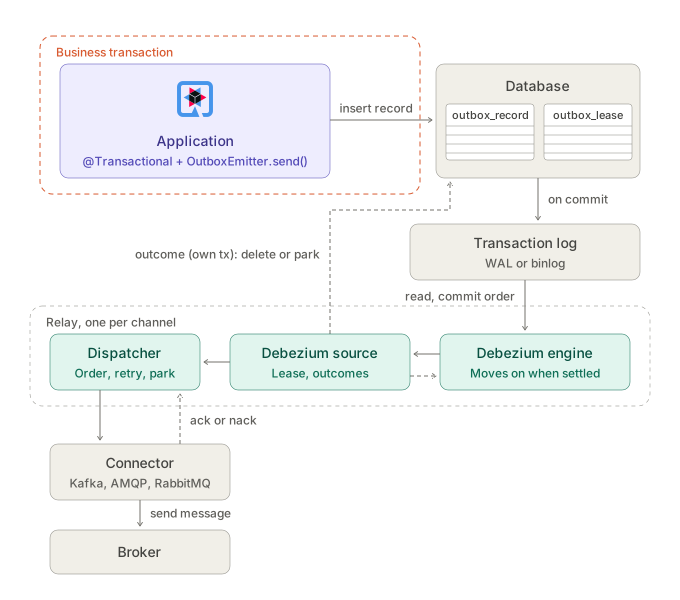
-
The application inserts the record in its business transaction, as with the polling relay.
-
When the transaction commits, the insert reaches the transaction log: the WAL on PostgreSQL, the binlog on MySQL.
-
The Debezium engine, running in the application, reads the log in commit order and hands a batch of changes to the Debezium source.
-
The source passes the batch’s records to the dispatcher, which sends them through the connector to the broker.
-
Acks and nacks come back to the dispatcher. A nacked record is retried in memory.
-
The source records each outcome in a short transaction of its own: the record is deleted (or marked sent), or parked.
-
Once every record of the batch is settled, the source tells the engine, which moves on to the next batch.
-
One reader. Only one instance reads the log for a channel: on PostgreSQL a replication slot has a single reader, and on MySQL two readers would both send every record. The source holds the channel lease and runs the engine only while it holds it, in every ordering mode. Another instance starts its engine when the lease expires.
-
Progress. The engine moves past a batch of changes only when every record in it is delivered or parked. The outbox table is the durable progress: a record is deleted, or marked sent, once delivered. The engine keeps its offsets in memory, and at each start it takes a snapshot of the channel’s pending records, in
seqorder, then streams from the log. A record that was in flight during a crash or a failover is sent again. -
Retries. A failed attempt is not written to the table: an update to a pending row would come back from the log. The attempt count is kept in memory and starts again from zero after a restart.
-
Parked records. Setting a parked record back to pending (see Retries) sends it again: the update comes back from the log.
-
Engine failures. If the engine stops with an error, for example because the replication slot was dropped or the binlog position was purged, the channel is reported down in the health check, and the relay starts the source again after a delay growing from
backoff.initialtobackoff.max.
-
Requirements
PostgreSQL:
-
wal_level=logicalon the server. -
A database user that may create a replication slot and a publication, or a slot and publication created in advance (
slot.name,publication.name). -
Monitoring of the replication slot. A slot that is not read keeps the server’s write-ahead log from being removed. The source sends heartbeats so the slot moves on while the outbox is idle.
MySQL 8.4 and later:
-
The binlog on, in row format with full row images:
log_bin,binlog_format=ROWandbinlog_row_image=FULL, which are the defaults. -
A database user with
SELECT,RELOAD,REPLICATION SLAVEandREPLICATION CLIENT. The engine connects as a replica; the user the application writes with usually lacks these, so setoutbox.relay.debezium.database.useranddatabase.passwordto another one. -
A binlog retention longer than any outage of the application. The snapshot at start does not need old binlog files, but a running engine that falls behind does.
Configuration
The engine connects with the default datasource, from quarkus.datasource.jdbc.url or quarkus.datasource.reactive.url and its username and password. The defaults depend on quarkus.datasource.db-kind.
Any Debezium engine or connector property can be set per channel under outbox.relay.debezium., and wins over the defaults:
| Property | PostgreSQL default | MySQL default |
|---|---|---|
|
|
|
|
|
|
|
|
same |
|
|
same |
|
|
same |
|
|
- |
|
|
- |
|
- |
a random id, so that two engines never share one |
|
- |
|
|
from the default datasource |
same |
The table name follows quarkus.messaging-outbox.table-name.
mp.messaging.outgoing.customer-events.outbox.relay.debezium.database.user=debezium
mp.messaging.outgoing.customer-events.outbox.relay.debezium.database.password=${DEBEZIUM_PASSWORD}
Other databases with a Debezium connector have no defaults and are not tested. To try one, set connector.class, table.include.list and the connector’s properties under outbox.relay.debezium..
Limits
-
Records pending at start are sent in
seqorder. When the engine starts (at application start, after a restart following a failure, or when another instance takes the lease over), the records already waiting come from its snapshot, ordered byseq, the insert order. Only records committed after that point are sent in commit order. Two overlapping transactions that both committed before the engine started can therefore be sent in insert order, as with the polling relay. -
JVM mode only. Native images are not supported.
-
Each channel runs its own engine: on PostgreSQL with its own slot and publication, on MySQL as its own replica connection. Many channels mean many slots or replica connections.
-
On MySQL, the snapshot at each start takes a brief global read lock (
snapshot.locking.mode=minimal), which needsRELOAD. -
With
ordering=key, the engine reads the next batch only when the current one is finished, so a key that keeps failing also holds back other keys once its batch is done. -
If parking a record fails to be recorded, its batch stays unfinished until the application restarts, when the record is read again.
Using an external Debezium CDC relay
Set outbox.relay.enabled=false to keep only the write side of this extension, and run Debezium yourself, for example on Kafka Connect, as the relay:
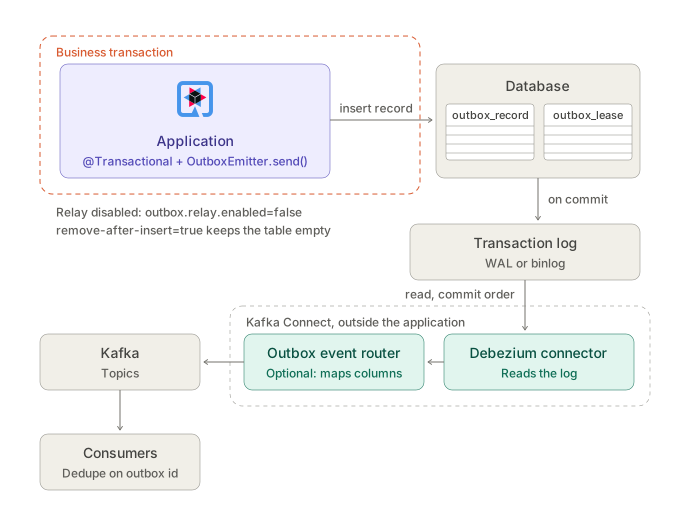
-
The application inserts the record in its business transaction. Its own relay is disabled.
-
When the transaction commits, the insert reaches the transaction log.
-
A Debezium connector on Kafka Connect, outside the application, reads the log in commit order.
-
Optionally, Debezium’s outbox event router turns each row into a message.
-
The connector writes to Kafka topics, and consumers read them, deduplicating on the outbox ID.
Nothing comes back to the application: no acks, no outcomes. Ordering, retries and delivery are Debezium’s and Kafka Connect’s. Then:
-
Nothing deletes the records unless you set
outbox.remove-after-insert=true: thensenddeletes each record in the transaction that writes it, as Debezium’s own outbox extension does. Debezium still reads the insert from the transaction log, and the table stays empty. Settombstones.on.delete=falseon the connector, or have consumers skip the delete events and tombstones. Without it, the table only grows. -
Consumers receive Debezium change events, not the original messages: the payload is base64 in
after.payload, and the outbox ID and key are columns, not headers. Debezium’s outbox event router can turn the rows into messages, with its column settings pointed at this table (outbox_id,msg_key,payload).
Comparison with Debezium
Both this extension and the Debezium outbox extension implement the transactional outbox pattern. The write side is the same: persist a row in the caller’s transaction. The read side is where they differ.
This extension fits more easily into an application that already uses Reactive Messaging: one Maven dependency, no external infrastructure, and the relay is built in.
The table compares this extension’s default polling relay with Debezium. The Debezium record source sits in between: it keeps this extension’s emitter, relay and per-record retries, and reads the transaction log with the Debezium embedded engine, for commit order and log-based latency without Kafka Connect.
| This extension (polling relay) | Debezium (log-based CDC) | |
|---|---|---|
Delivery order |
|
Commit order, read from the transaction log. No gap. |
Latency |
Immediate after commit with Hibernate ORM (JTA signal). With the reactive store, up to |
Near real time, bounded by log reading. |
Database load |
Claim queries, lease renewal, and an update or delete per record. |
Reads the log. Little extra query load, but needs logical replication enabled, privileges, and a replication slot (or the binlog on MySQL). |
Infrastructure |
None beyond the application and its database. |
Kafka Connect, Debezium Server, or the embedded engine. |
Brokers |
Any Reactive Messaging connector, with metadata round-trip for Kafka, AMQP and RabbitMQ. |
Kafka first. Debezium Server has other sinks, without per-connector metadata mapping. |
Delivery signal |
The broker’s ack, per record. Nack means retry with backoff, then park. |
Offsets. Errors go through Connect’s error handling and dead-letter queue, not per-record retries. |
Exactly-once |
No. At-least-once, and consumers deduplicate on the outbox ID. |
Possible on Kafka with Kafka Connect exactly-once source support. |
Several application instances |
Built in: the lease for |
Not the application’s concern. One connector task reads the log. |
When the relay is down |
Rows pile up in the outbox table, which is visible and easy to query. |
The log is retained behind the replication slot, which can fill the database’s disk if nobody notices. |
Supported databases |
Any database Hibernate supports. |
The databases with a Debezium connector, each with its own log setup. |
When this extension is the better choice
-
The team has no Kafka Connect and doesn’t want to run Debezium.
-
The broker is AMQP or RabbitMQ.
-
The application already uses Reactive Messaging channels and their metadata.
-
Operators want per-message retry and park with a table they can query.
Most Quarkus applications that need an outbox look like this.
When Debezium is the better choice
-
Strict commit order across concurrent writers matters.
-
Throughput is high enough that polling and per-record updates load the database.
-
The team needs exactly-once on Kafka.
-
The organization already runs CDC.
The two are not exclusive: relay with the Debezium record source, or set outbox.relay.enabled=false and use Debezium on Kafka Connect (see Using an external Debezium CDC relay).
Configuration reference
All keys sit under mp.messaging.outgoing.<channel>.outbox..
| Key | Default | Description |
|---|---|---|
|
|
|
|
auto-detected |
|
|
default unit |
Hibernate ORM store only. Persistence unit whose session writes and relays the records. It must be the unit the outbox entities belong to, set by |
|
|
Fail |
|
|
Set to |
|
|
Delete the record in the transaction that writes it, so the table stays empty. Only with |
|
|
The record source for the relay. |
|
|
|
|
|
Upper bound on unacknowledged records for |
|
|
Recovery poll period. |
|
|
Records claimed per query. |
|
|
How long a claim or channel lease stays valid without renewal. |
|
|
First retry delay, doubled per attempt. |
|
|
Retry delay ceiling. |
|
|
Attempts before a record is parked. |
|
|
|
|
|
Age at which kept records are purged. |
|
|
How often the relay purges sent records. |
|
|
Wait for the broker ack in fallback mode. |
|
by priority |
Class name of the |
|
|
Hibernate Reactive store only. Delay between persist and the relay signal. |
Build-time keys sit under quarkus.messaging-outbox.:
| Key | Default | Description |
|---|---|---|
|
|
The name of the outbox record table. |
|
|
The name of the outbox lease table. |
|
|
The persistence unit the outbox entities belong to. |