MCP Protocol Overview
This page provides an overview of the Model Context Protocol (MCP) and how it works.
What is MCP?
The Model Context Protocol (MCP) is an open protocol that standardizes how applications provide knowledge and capabilities (context) to Large Language Models (LLMs). Created by Anthropic, MCP enables AI assistants like Claude to connect to external data sources and tools in standardized way.
The Problem MCP Solves
Before MCP, integrating external data and tools with LLMs faced several challenges:
-
Each data source required integration code (HTTP client, database connector, etc.)
-
LLMs were often confined to information available at training time
-
No standard way for tools, databases, and services to expose their capabilities to AI
MCP addresses these issues by providing a universal, open protocol for context exchange.
Protocol Specification
quarkus-mcp-server implements the 2026-07-28 version of the MCP specification.
The specification defines:
-
How messages are formatted using a JSON-RPC 2.0-based communication
-
How messages are transmitted using various transport such as STDIO and HTTP (with SSE and Streamable variants)
-
How the client and server negotiate capabilities during connection initialization and how this connection is managed throughout its lifecycle
-
The main primitives: Tools, Resources, and Prompts
-
More advanced features such as: Sampling, Elicitation, and Roots
See the official MCP specification for complete technical details.
Compliance and Testing
The quarkus-mcp-server implementation is tested against the official MCP Conformance Test Suite and against real MCP clients to maximize specification compliance.
Conformance test integration lives in the conformance/ module of the project.
If you encounter any issues or discrepancies with the specification, please open an issue on https://github.com/quarkiverse/quarkus-mcp-server/issues.
Known Limitations
The following MCP features are not currently supported:
-
Streamable HTTP - Resumability and Redelivery (optional feature)
If you encounter a problem or discrepancy, please file an issue.
JSON-RPC Layer
MCP uses JSON-RPC 2.0 as its message format, providing a lightweight and language-agnostic communication layer.
Message Types
MCP defines three types of JSON-RPC messages:
- Requests
-
Messages that expect a response from the receiver. Each request has a unique
idthat the response must reference.{ "jsonrpc": "2.0", "id": 1, "method": "tools/list", "params": {} } - Responses
-
Messages sent in reply to requests, containing either a
resultor anerror.{ "jsonrpc": "2.0", "id": 1, "result": { "tools": [...] } } - Notifications
-
One-way messages that do not expect a response. No
idfield is present.{ "jsonrpc": "2.0", "method": "notifications/progress", "params": { "progressToken": "abc123", "progress": 50, "total": 100 } }
Bidirectional Communication
Unlike traditional REST APIs, MCP is bidirectional:
-
Client-to-Server Requests: Clients invoke server capabilities (e.g., calling tools, reading resources)
-
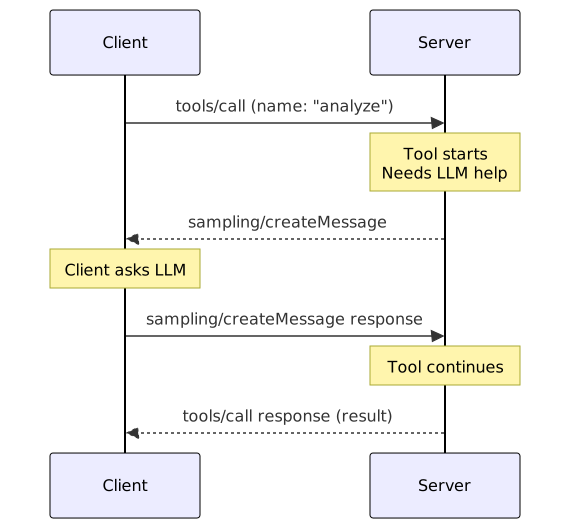
Server-to-Client Requests: Servers can request services from clients (e.g., LLM sampling, user input via elicitation)
-
Both Directions for Notifications: Progress updates, log messages, and lifecycle events flow in both directions
Capability Negotiation
MCP uses capability negotiation to establish what features are available between client and server.
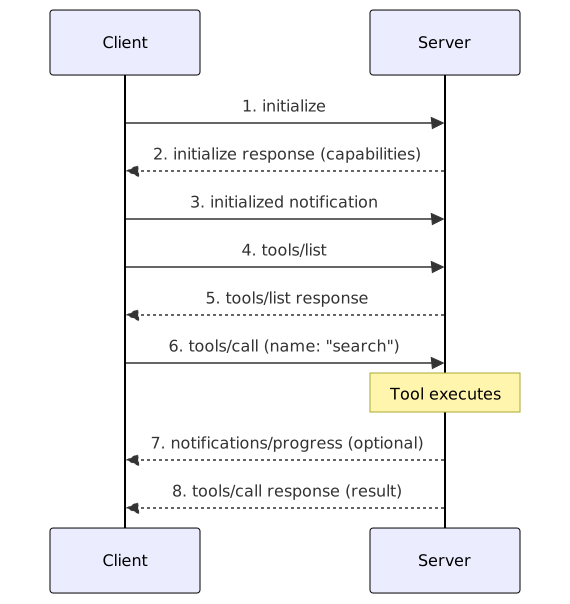
Initialization Sequence
-
Client sends
initializerequest:{ "jsonrpc": "2.0", "id": 1, "method": "initialize", "params": { "protocolVersion": "{spec-version}", "clientInfo": { "name": "my-mcp-client", "version": "1.0.0" }, "capabilities": { "sampling": {}, "elicitation": {}, "roots": { "listChanged": true } } } } -
Server responds with its capabilities:
{ "jsonrpc": "2.0", "id": 1, "result": { "protocolVersion": "{spec-version}", "serverInfo": { "name": "quarkus-mcp-server", "version": "1.0.0" }, "capabilities": { "tools": {}, "resources": { "subscribe": true }, "prompts": {}, "logging": {} } } } -
Client sends
initializednotification:{ "jsonrpc": "2.0", "method": "notifications/initialized" }
Stateless Discovery
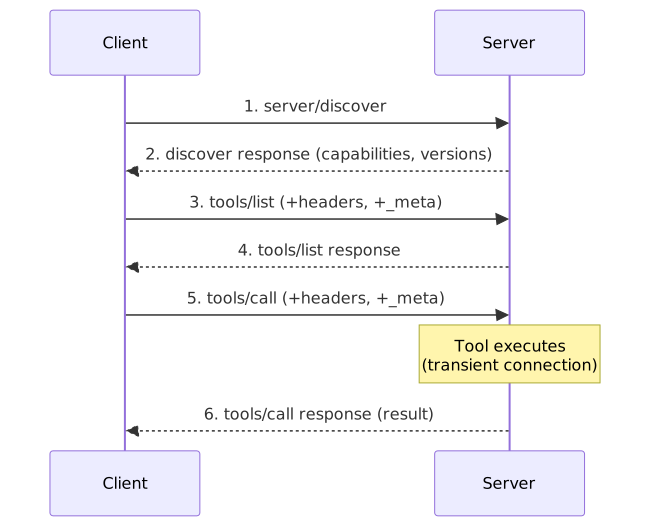
Starting with protocol version 2026-07-28, stateless clients skip the initialize/initialized handshake.
A stateless client can optionally call server/discover first to learn the server’s supported versions and capabilities:
{
  "jsonrpc": "2.0",
  "id": 1,
  "method": "server/discover",
  "params": {
    "_meta": {
      "io.modelcontextprotocol/protocolVersion": "2026-07-28"
    }
  }
}
The server responds with its supported versions, capabilities, and server info:
{
  "jsonrpc": "2.0",
  "id": 1,
  "result": {
    "supportedVersions": ["2026-07-28", "2025-11-25", "2025-06-18", "2025-03-26", "2024-11-05"],
    "capabilities": {
      "tools": {},
      "resources": {},
      "prompts": {}
    },
    "_meta": {
      "io.modelcontextprotocol/serverInfo": {
        "name": "acme-quarkus-server",
        "version": "1.0.0"
      }
    },
    "ttlMs": 0,
    "cacheScope": "public"
  }
}
In the 2026-07-28 schema the DiscoverResult has no top-level serverInfo member; the server identity is carried in _meta under the io.modelcontextprotocol/serverInfo key.
No initialized notification is sent. Each subsequent request is self-contained.
See Stateless Mode for details on required headers and _meta fields.
The server/discover result carries caching hints (ttlMs and cacheScope), which are required fields of this result.
They default to ttlMs = 0 (immediately stale) and cacheScope = public, and can be configured via application properties:
quarkus.mcp.server.discover.ttl-ms=45000
quarkus.mcp.server.discover.cache-scope=public
Capability Checking
After initialization, both parties know what features are available:
-
Client capabilities (what the server can request from the client):
-
sampling: Allows invoking the client-side LLM from the server side -
elicitation: User input collection (e.g., forms, confirmations) -
roots: Access to client’s root directories/contexts
-
-
Server capabilities (what the client can request from the server):
-
tools: Executable functions -
resources: Readable/subscribable data -
prompts: Reusable prompt templates -
logging: Server-to-client log messages
-
The Quarkus MCP server automatically includes capabilities in the initialization response based on what features you’ve implemented (tools, resources, prompts) in your application.
Connection Lifecycle
Understanding the MCP connection lifecycle helps you manage server state and resources effectively.
Lifecycle States

| The exact sequence is not strictly enforced by the protocol, but this is the typical flow for most clients and servers. |
Connection Management
- STDIO Transport
-
-
Connection lifecycle tied to process lifecycle
-
Server exits when STDIN closes
-
No explicit shutdown request needed
-
- HTTP Transports
-
-
Stateful connections are session-based; each session maintains separate state
-
Stateless clients (protocol version
2026-07-28+) use transient connections — created per-request with no session -
McpConnection.isTransient()returnstruefor transient connections -
Explicit
shutdownrequest recommended for clean termination of stateful sessions -
SSE connections require keep-alive mechanism
-
- WebSocket Transport (custom transport)
-
-
Bidirectional, persistent connection
-
WebSocket close frame triggers shutdown
-
Supports reconnection with new initialization
-
Handling Initialization Events
The Quarkus MCP server provides annotations to hook into lifecycle events:
import io.quarkiverse.mcp.server.Notification;
import io.quarkiverse.mcp.server.Notification.Type;

@Notification(Type.INITIALIZED)
void onInitialized(McpConnection connection) {
    // Called when client is ready
    // Initialize per-connection state here
}
This allows you to perform setup tasks (e.g., loading user-specific data) after capability negotiation completes.
Core Primitives
MCP defines three primary primitives for exposing functionality to clients.
Tools
Tools are executable functions that the LLM can invoke to perform actions or retrieve computed information.
-
Defined with JSON Schema for input validation
-
Return structured or unstructured results
-
Support both synchronous and asynchronous execution
-
Can report progress and handle cancellation
Example use cases: Database queries, API calls, code execution, file operations
See: Tools Specification
Resources
Resources are data sources that clients can read and optionally subscribe to for updates.
-
Identified by URI (e.g.,
file:///path/to/file,database://table/row) -
Support static URIs and URI templates with variables
-
Can be text or binary content
-
Clients can subscribe to receive update notifications
Example use cases: File contents, database records, API responses, configuration data
Prompts
Prompts are reusable templates for LLM interactions, parameterized with arguments.
-
Define conversation starters or task templates
-
Support multiple message roles (system, user, assistant)
-
Can include embedded resources
-
Completion API for argument suggestions
Example use cases: Code review templates, analysis frameworks, guided workflows
Message Flow Examples
Subscription Notifications (Stateless)
With stateless protocol versions, resources/subscribe and resources/unsubscribe are not available.
Instead, stateless clients use subscriptions/listen to open a notification stream filtered by notification type.
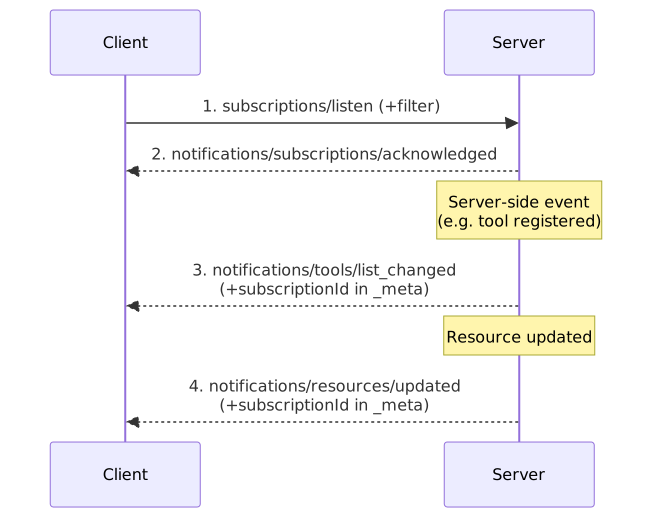
The subscriptions/listen request specifies a filter in the notifications field of the params object:
{
  "jsonrpc": "2.0",
  "id": 1,
  "method": "subscriptions/listen",
  "params": {
    "notifications": {
      "toolsListChanged": true,
      "promptsListChanged": true,
      "resourcesListChanged": true,
      "resourceSubscriptions": ["file:///status.txt"]
    },
    "_meta": {
      "io.modelcontextprotocol/protocolVersion": "2026-07-28",
      "io.modelcontextprotocol/clientInfo": { "name": "my-client", "version": "1.0" }
    }
  }
}
The server acknowledges the subscription immediately with notifications/subscriptions/acknowledged.
Subsequent matching notifications include the io.modelcontextprotocol/subscriptionId field in _meta, set to the original request ID (in this case 1).
See Stateless Mode for details on how subscriptions work with stateless connections.
Multi Round-Trip Request (MRTR)
With stateless protocol versions, the server cannot send server-initiated requests (such as sampling or elicitation).
Instead, it uses the Multi Round-Trip Requests (MRTR) pattern: the server returns an input_required result, and the client retries with the gathered input.

See Stateless Mode for details on which protocol versions use this pattern.
Task-augmented Tool Call
With the quarkus-mcp-server-tasks extension, a tool can execute its work asynchronously as a task for clients that declared the Tasks extension (io.modelcontextprotocol/tasks).
The server responds immediately with a task handle and the client polls the task until it reaches a terminal status.
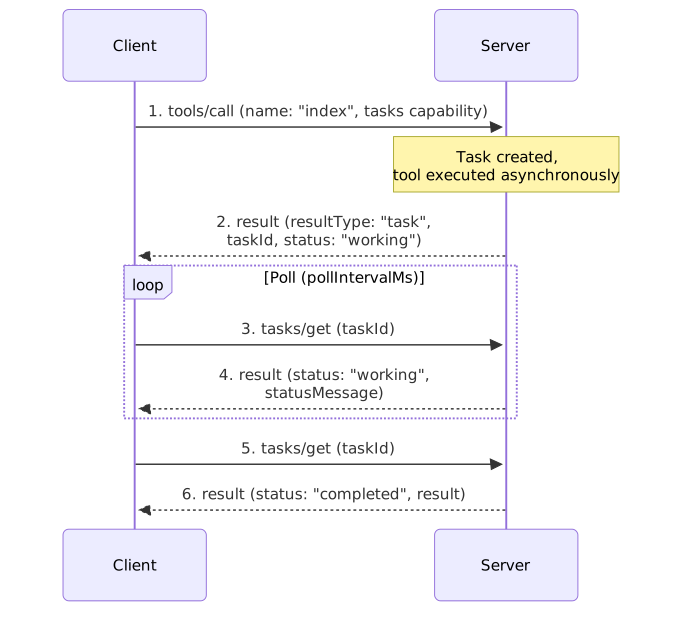
A task that needs input moves to the input_required status; the client fulfills the inputRequests via tasks/update.
A task is cancelled with tasks/cancel.
See MCP Tasks for details.
See Also
-
Architecture - Quarkus MCP Server architecture
-
Transports - Available transport mechanisms