Quarkus Flow Initialization Process
This reference guide describes the initialization flow at a high level. It focuses on the lifecycle phases and the extension points that users can rely on, while intentionally avoiding low-level implementation details that may change over time.
Overview
Quarkus Flow follows Quarkus’s build-time optimization philosophy, performing as much work as possible during compilation to minimize runtime overhead. The initialization process is divided into distinct phases:
-
Build-Time Phase: Discovery and registration of workflows
-
Runtime Initialization Phase: WorkflowApplication setup with providers
-
Registry Warmup Phase: Loading and caching workflow definitions
-
Optional Extensions: Persistence, Durable Kubernetes, and Agentic Workflows
Initialization Sequence Diagram
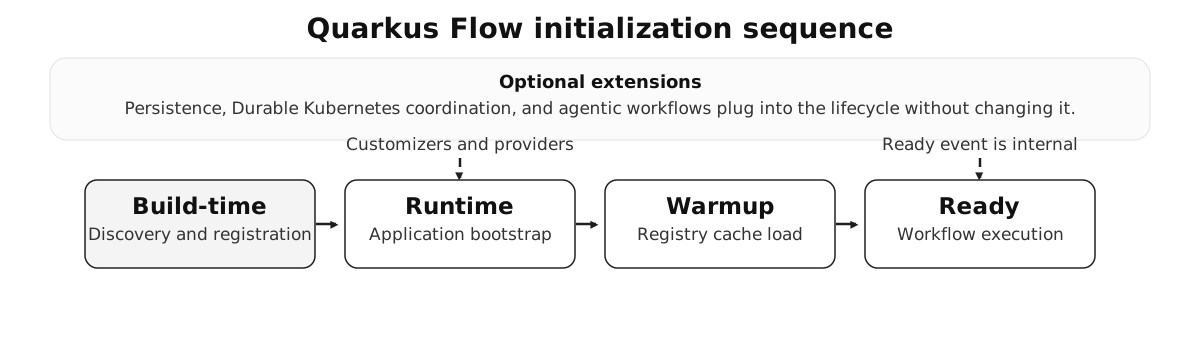
The diagram shows how build-time discovery flows into runtime bootstrap, registry warmup, and the ready state. Optional extensions plug into the same lifecycle without changing the overall sequence.
Build-Time Phase
The build-time phase is where Quarkus Flow discovers workflows and prepares them for runtime execution. This happens during Maven or Gradle compilation.
1. Workflow Discovery
The extension scans for workflows in two ways:
-
Java DSL workflows are discovered from classes that extend
Flow. -
YAML and JSON definitions are discovered from the configured workflow location.
-
Each discovery is converted into internal build metadata so runtime startup stays fast.
2. WorkflowDefinition Bean Registration
Discovered workflows are turned into CDI-managed WorkflowDefinition beans.
-
Java DSL workflows are registered directly.
-
YAML and JSON workflows are compiled into generated flow classes before they are exposed to CDI.
-
The result is a consistent workflow abstraction at runtime, regardless of the source format.
3. WorkflowApplication Bean Configuration
During augmentation, the extension prepares the WorkflowApplication bean and wires in the capabilities available in the current build.
-
Tracing is enabled when configured.
-
Metrics support is attached when the platform provides it.
-
The bean is declared for CDI so the runtime can finish assembly during application startup.
Runtime Initialization Phase
When the Quarkus application starts, CDI initializes the WorkflowApplication and the supporting runtime services.
1. WorkflowApplication Builder Setup
At startup, Quarkus Flow assembles the WorkflowApplication with the providers needed for execution.
-
Tracing listeners are attached when enabled.
-
Model factories are registered for Java and JSON workflow payloads.
-
The application ID is applied when available.
-
Event adapters, secret resolution, config access, HTTP clients, metrics, and fault tolerance are wired in.
-
Registered customizers are applied before the application is built and the shutdown hook is installed.
2. Provider Injection Details
Application ID
The application ID is derived from quarkus.application.name when present. Persistence and distributed coordination features rely on this stable identifier.
HTTP Client Provider
HTTP clients are resolved per workflow and per task, so the runtime can apply the right configuration for each external call.
Fault Tolerance Provider
HTTP and OpenAPI calls can be wrapped with retry, circuit breaker, and timeout behavior when fault tolerance support is enabled.
3. WorkflowApplicationBuilderCustomizer Extension Point
Extensions can customize the WorkflowApplication before it is built:
@ApplicationScoped
public class MyCustomizer
    implements WorkflowApplicationBuilderCustomizer {

    @Override
    public int priority() {
        return 1000; // Higher priority runs later
    }

    @Override
    public void customize(WorkflowApplication.Builder builder) {
        // Add custom configuration
        builder.withAdditionalObject("my-key", myValue);
    }
}
Customizers are executed in priority order, with lower numbers running first.
Registry Warmup Phase
After the WorkflowApplication is initialized, the registry warmup step loads workflow definitions into cache.
1. Startup Event Observation
The warmup step runs after application startup. In development mode it is synchronous for immediate feedback; in production it is asynchronous so startup is not delayed. Internally, the extension emits WorkflowApplicationReadyEvent after warmup so supporting extensions can react to the initialized application state. We do not recommend user code listening to that event directly.
2. Registry Warmup Process
The registry iterates over the available WorkflowDefinition beans, resolves their descriptors, and caches them for fast lookup during execution.
-
Available workflow definitions are discovered from CDI.
-
Each definition is resolved into a workflow descriptor.
-
The descriptor cache is populated so workflow execution can start quickly after boot.
Optional Extensions Initialization
Persistence (JPA/Redis/MVStore)
When persistence support is available, the extension contributes a persistence handler and an application customizer that attach it to the WorkflowApplication. That allows workflow state to be stored in the configured persistence backend.
Initialization Timing
Understanding when each phase occurs:
| Phase | When | Duration Impact |
|---|---|---|
Build-Time Discovery |
Maven/Gradle compile |
Increases build time slightly (typically <1s for dozens of workflows) |
Bean Generation |
Maven/Gradle compile |
Minimal impact (bytecode generation is fast) |
WorkflowApplication Init |
Application startup (CDI initialization) |
~50-200ms depending on number of providers |
Registry Warmup |
After CDI initialization (async in prod, sync in dev) |
~10-50ms per workflow (depends on complexity) |
Persistence Restore |
After registry warmup (if enabled) |
Depends on number of interrupted workflows and database latency |
Lease Acquisition |
Before WorkflowApplication init (if Durable K8s enabled) |
Up to 30s timeout (typically <5s in healthy cluster) |
Troubleshooting Initialization Issues
Workflow Not Found
Symptom: WorkflowDefinition bean not found at runtime.
Possible causes:
-
The class does not extend
Flow. -
The YAML file is not in the scanned location.
-
A build-time error occurred during workflow discovery.
Solution: Enable debug logging with quarkus.log.category."io.quarkiverse.flow.deployment".level=DEBUG.
Slow Startup
Symptom: Application takes a long time to start.
Possible causes:
-
Warmup is synchronous in production.
-
There are many workflows to instantiate and cache.
-
Persistence restore is loading interrupted workflows.
Solution:
-
Verify async warmup in production.
-
Temporarily disable auto-restore with
quarkus.flow.persistence.auto-restore=false. -
Profile startup with
-Dquarkus.profile.record-startup-method-times=true.
Lease Acquisition Timeout (Kubernetes)
Symptom: Pod exits with code 1 and logs show LeaseAcquisitionException with message "Failed to acquire Kubernetes lease after PT30S. This pod cannot participate in the durable workflow pool. Exiting to allow Kubernetes to restart with a fresh lease attempt."
Behavior: When lease acquisition times out, the application exits immediately with exit code 1, triggering Kubernetes to restart the pod for a fresh acquisition attempt. This provides faster recovery than waiting for liveness probe failures.
Possible causes:
-
The pod lacks RBAC permissions to manage Leases.
-
All available leases in the pool are held by other pods.
-
The Kubernetes API server is unreachable or slow to respond.
Solution:
-
Verify RBAC with
kubectl auth can-i create leases --as=system:serviceaccount:NAMESPACE:SERVICE_ACCOUNT. -
Check existing leases with
kubectl get lease -l io.quarkiverse.flow.durable.k8s/pool=POOL_NAME. -
Increase the timeout with
quarkus.flow.durable.kube.lease.member.acquire-timeout=60s. -
Ensure the pool size matches your deployment replica count.
Persistence Not Working
Symptom: Workflows do not resume after restart.
Possible causes:
-
No persistence extension is present.
-
The application ID changed between restarts.
-
Auto-restore is disabled.
Solution:
-
Verify the persistence extension is installed.
-
Keep the application ID stable with
quarkus.application.nameor Durable Kubernetes. -
Enable restore with
quarkus.flow.persistence.auto-restore=true.
Extension Points for Custom Initialization
Developers can hook into the initialization process:
1. WorkflowApplicationBuilderCustomizer
Customize the WorkflowApplication before it’s built:
@ApplicationScoped
public class MyCustomizer
    implements WorkflowApplicationBuilderCustomizer {

    @Override
    public int priority() {
        return 100;
    }

    @Override
    public void customize(WorkflowApplication.Builder builder) {
        // Add custom configuration
    }
}
2. Custom WorkflowExecutionListener
Monitor workflow execution:
@ApplicationScoped
public class MyListener implements WorkflowExecutionListener {

    @Override
    public void onWorkflowStart(WorkflowContext context) {
        // Called when a workflow starts
    }

    @Override
    public void onWorkflowEnd(WorkflowContext context) {
        // Called when a workflow completes
    }
}
See Also
-
Engine Architecture - High-level architecture overview
-
Configure State Persistence - Persistence setup guide
-
Durable Workflows in Kubernetes - Kubernetes deployment patterns
-
Listen to Workflow Events - Custom listener guide
-
Quarkus CDI Reference - Understanding Quarkus startup events