Quarkus Banner
Generate a colourful FIGlet ASCII-art startup banner for your Quarkus application — rendered at build time from a piece of text and a font, painted in the ANSI colours you choose, and shown at start-up the same way Quarkus renders its own banner.
Highlights
-
🎨 Colour, including multi-colour banners. Set a foreground and background colour, or colour parts of the text inline with
{colour}markers —quarkus.banner-generator.text={red}My {bright-cyan}Service— painted per-word with kerning preserved. -
🖥️ Console-aware. Colour is emitted only when the terminal supports it; log files and colour-less consoles get a clean, plain banner.
-
🔤 ~250 bundled fonts, selectable by name and validated at build time.
-
🧩 Dev UI preview to try text, fonts and colours live, and print the result straight to the running app’s console.
-
📦 No third-party rendering dependencies — banners are drawn by a small, self-contained FIGlet renderer bundled with the extension.
How it works
At build time the extension renders your text into ASCII art with one of the ~250 bundled FIGlet fonts and
installs it as a TextBannerFormatter on the console log handler — the exact mechanism Quarkus uses for its
own banner. This means:
-
the banner appears as a header above the log output and honours your console format and colour settings;
-
Quarkus' built-in banner is replaced automatically (you do not need to set
quarkus.banner.enabled=false); -
if generation is disabled, or the text cannot be rendered, the default Quarkus banner is left untouched.
Unlike Quarkus' own banner, the generated banner is also shown when running tests.
|
Because the banner is baked at build time, changing the text or font requires a rebuild (or a live-reload in dev mode). In dev mode a live-reload only runs on the next HTTP request to the application, so for a quick edit-and-see loop use the Dev UI card instead — it renders on demand with no restart. |
Installation
To use this extension, add the io.quarkiverse.banner:quarkus-banner dependency to your build file.
With Maven, add the following to your pom.xml:
<dependency>
    <groupId>io.quarkiverse.banner</groupId>
    <artifactId>quarkus-banner</artifactId>
    <version>1.6.0</version>
</dependency>
With Gradle, add the following to your build.gradle:
implementation("io.quarkiverse.banner:quarkus-banner:1.6.0")Usage
Configure the banner in your application.properties:
# The text to render (defaults to quarkus.application.name, or "Quarkus")
quarkus.banner-generator.text=My Service

# One of the bundled fonts (defaults to "standard")
quarkus.banner-generator.font=doom

# Optional ANSI colours (applied only when the console supports colour)
quarkus.banner-generator.color=bright-cyan
quarkus.banner-generator.background-color=blue

# ...or colour parts of the text inline with {colour} markers, for a multi-colour banner:
quarkus.banner-generator.text={red}My {bright-cyan}Service
The available configuration properties are listed in the Configuration Reference. All of them are fixed at build time.
|
Colour is only emitted when the console supports ANSI colour — governed by For a multi-colour banner, embed |
Multiple lines
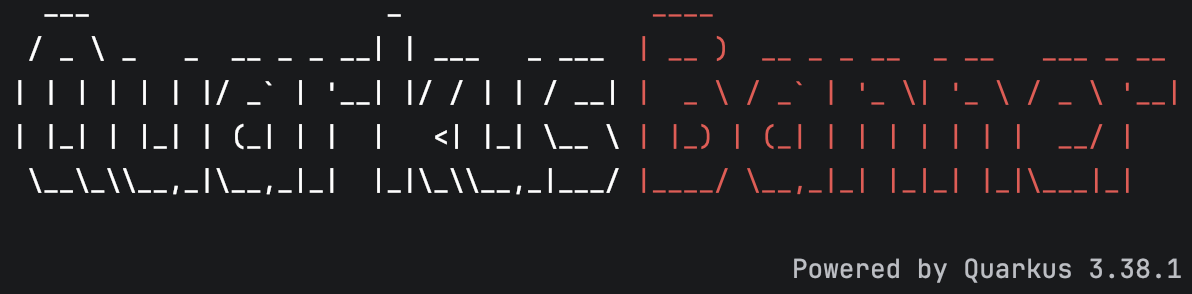
Split the text into lines with \n (a literal backslash-n, which is what a .properties value delivers — an actual newline also works).
Each line is rendered as its own FIGlet block and the blocks are stacked:
quarkus.banner-generator.text={bright-white}Quarkus\n{red}Banner
quarkus.banner-generator.alignment=center
quarkus.banner-generator.line-spacing=1-
alignment—left(default),centerorrightpositions each line within the width of the widest line. -
line-spacing(default1) is the number of blank rows between stacked lines, so a descender likegorjon one line does not touch the line below. -
Per-line inline
{colour}markers and the background box still apply; a background fills the banner (including the gaps between lines) but never thePowered by Quarkustagline.
Fonts
quarkus.banner-generator.font must be one of the 246 FIGlet fonts bundled with, and tested against, this
extension — for example standard, slant, doom, big, colossal, banner3-D or 3d_diagonal. The
value is matched to a font by name, case-insensitively.
Only bundled fonts are accepted; arbitrary classpath resources, file paths and remote URLs are intentionally not supported, and an unknown font name is reported as an error at build time, so typos are caught immediately.
The full list of bundled fonts and their authors is in the
FIGLET-FONTS.md file at the root of
the repository.
|
The bundled fonts originate from the FIGlet font collection and are authored by many individuals under varied
terms. Each font’s original header (including author credit) is preserved in the |
Dev mode
Quarkus' interactive dev console (quarkus:dev) repaints its pinned prompt and can erase the start-up banner
on narrow terminals. This affects Quarkus' own banner too, not just this extension.
If you want the banner to survive in dev mode regardless of terminal width, use the basic console for the dev profile only:
%dev.quarkus.console.basic=trueThis has no effect in production — the interactive console only runs in dev and test modes.
Dev UI
Because the banner is rendered at build time, changing quarkus.banner-generator.text or …font in
application.properties only takes effect on the next live-reload — and in dev mode a live-reload is only
triggered by the next HTTP request to the application. For a service that receives no requests while you work
on it, nothing appears to happen when you save the file.
To make trying fonts and text quick and immediate, the extension contributes a Quarkus Banner card to the
Dev UI, available in dev mode at http://localhost:8080/q/dev-ui/.
Open the card’s Preview page to test and check your banner:
-
Text — type any text to render, including inline
{colour}markers. It defaults to the configuredquarkus.banner-generator.text(or the application name). -
Font — pick any of the bundled fonts from the selector. It defaults to the configured font.
-
Colour and Background — pick the foreground and background colours. They default to the configured colours.
-
Powered by Quarkus — toggle the tagline that is appended under the banner.
The preview updates live as you change any of these — no restart and no HTTP request required — so you can compare fonts, wording and colours instantly, with colour rendered accurately on screen. The rendering uses the exact same code path as the start-up banner, so what you see is what you get at boot.
Press Print to log to render the current text and font straight to the application console, exactly as the start-up banner would appear:
 _____  ______      __  ___    _ _____   _______ ______  _____ _______
|  __ \|  ____\ \    / / |  | |_   _| |__   __|  ____|/ ____|__   __|
| |  | | |__   \ \  / /| |  | | | |      | |  | |__  | (___    | |
| |  | |  __|   \ \/ / | |  | | | |      | |  |  __|  \___ \   | |
| |__| | |____   \  /  | |__| |_| |_     | |  | |____ ____) |  | |
|_____/|______|   \/    \____/|_____|    |_|  |______|_____/   |_|

                                            Powered by Quarkus 3.x.x
Once you settle on a text and font, set them in application.properties so they are baked into the build.
Every setting on the card is a preview only: it never changes your configuration or the installed banner.
Rendering
Banners are drawn by a small, self-contained FIGlet renderer bundled with the extension — a clean-room
implementation of the public FIGfont v2 standard, validated byte-for-byte against the reference figlet
program. It carries no third-party rendering library, so the extension has no non-Apache runtime or build
dependencies for rendering and nothing extra ends up on your classpath.