Goblin - Chaos Engineering Extension for Quarkus
Goblin is a chaos engineering extension for Quarkus that lets you inject latency, exceptions, HTTP failures, and dependency degradation into your running application — without touching a single line of source code.
It is designed for one specific purpose: verifying that your resilience mechanisms actually work. You declared @Timeout, @Fallback, @Retry, health probes, or circuit breakers? Goblin gives you the tool to prove they hold under real failure conditions — at the HTTP boundary, on outgoing HTTP calls, and directly inside your business beans through a service-layer interceptor that runs with Fault Tolerance.
| Think of Goblin as Chaos Monkey for the Quarkus ecosystem — but with stronger safety guarantees. |
Why Goblin?
Quarkus has excellent resilience primitives (MicroProfile Fault Tolerance, Mutiny reactive timeouts, health probes), but no built-in way to trigger the failures these mechanisms are supposed to handle. You end up writing fragile integration tests that mock exceptions, or worse, discovering production failure modes for the first time in production.
Goblin fills that gap: inject realistic failures at the HTTP layer during development, observe how your application reacts, and iterate.
Key design decisions:
-
Dev by default, tests on opt-in. Chaos activates under
quarkus:dev, and under@QuarkusTestonly withquarkus.goblin.test.enabled=true, so adding the extension never slows down nor breaks an existing test suite. Never in production: Goblin is declared in theprovidedscope, so the packaged application does not contain it, and a production build that still carries it fails. -
Zero code modification. No
@ChaosLatencyannotations to scatter across your endpoints. Configuration is the only interface. -
Non-destructive. You can target specific packages, exclude annotated methods, and control the percentage of affected requests.
-
Composable. Multiple assault types can be active simultaneously on the same request.
-
Multi-layer. Chaos resolves per request (or per consumed message) against the armed layers (
DATABASE→MESSAGING→SERVICE→HTTP_IN, withHTTP_OUTrolled per outgoing call), so a fault injected deepest propagates up through the resilience mechanisms above it. -
Persistent state. Dev UI config changes survive restarts via automatic disk persistence (
.goblin-state.json). -
Repeatable experiments. Save the current assault configuration as a named scenario and rerun it in one click, from the Dev UI or through Dev MCP (
.goblin/scenarios/).
Quick start
Add the dependency
<dependency>
    <groupId>io.quarkiverse.goblin</groupId>
    <artifactId>quarkus-goblin</artifactId>
    <version>${goblin.version}</version>
    <scope>provided</scope>
</dependency>
The provided scope is not optional: Goblin must never reach production. It keeps the extension in quarkus:dev and @QuarkusTest and out of the packaged application, and a production build that still carries Goblin fails (see [production]). With Gradle, declare it as a quarkusDev and a testImplementation dependency.
|
That’s it. Start your application in dev mode:
./mvnw quarkus:devYou will see a warning log confirming chaos is active:
WARN goblin event=activated timestamp=2026-10-21T10:00:00.004Z origin=startup profile=NONE level=100 layers=HTTP_OUT,HTTP_IN config="latency enabled (100 - 5000 ms)"Every assault, configuration change and switch on or off is then logged the same way: see Structured logs.
Verify it works
With the default configuration (latency assault enabled, 100% of requests), every REST endpoint and reactive route (@Route) will have an artificial delay applied — except a non-blocking REST endpoint, whose event-loop thread Goblin never blocks (see Assault types). Hit any endpoint and observe the added latency:
curl -w "\nTime: %{time_total}s\n" http://localhost:8080/api/helloYou should see a response time well above your normal baseline.
See it in action
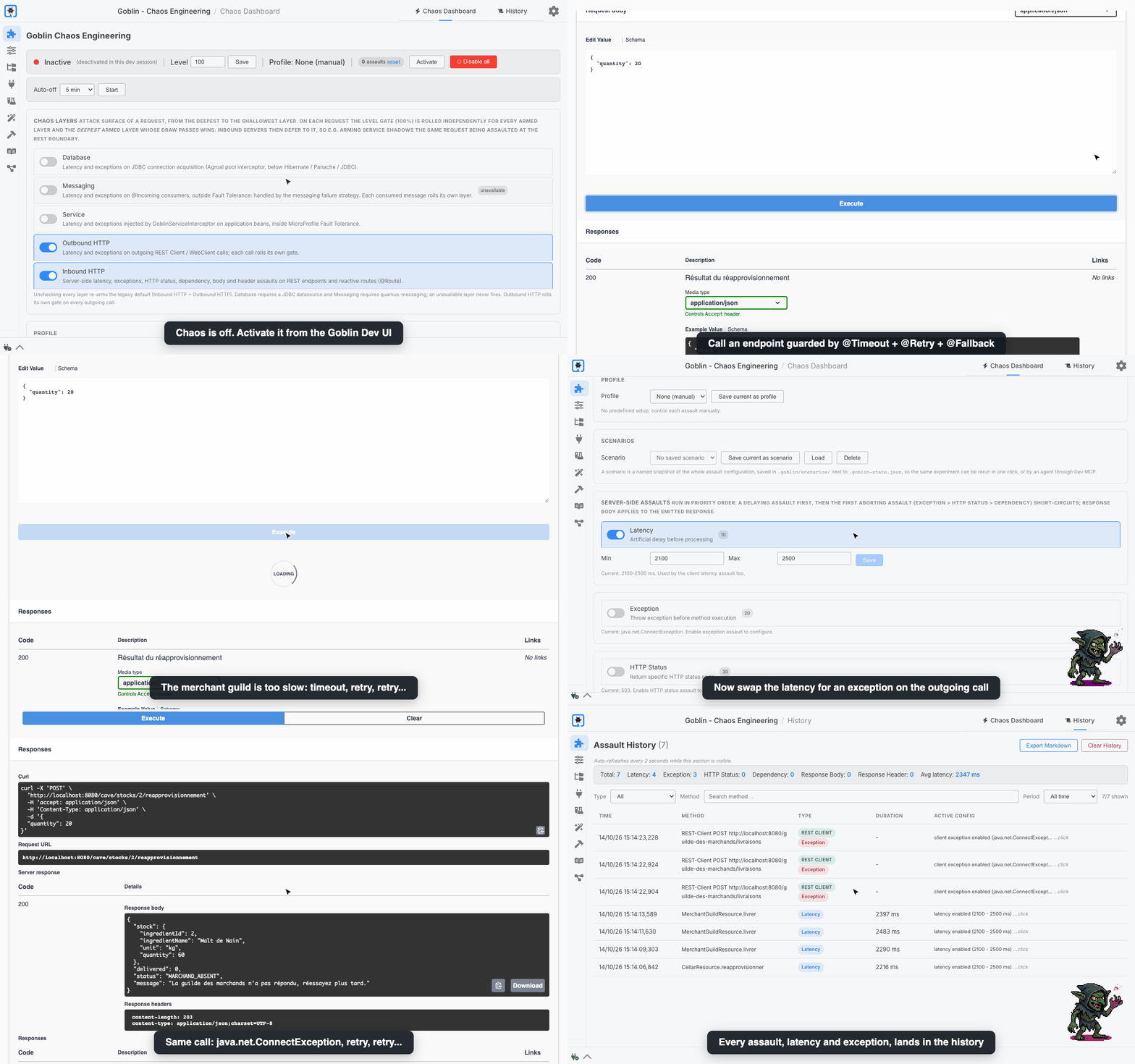
quarkus-goblin-demo — The Falling Whale — is a complete Quarkus application to try Goblin on: a medieval tavern whose services are guarded by MicroProfile Fault Tolerance (@Retry, @Fallback, @Timeout, @CircuitBreaker, @RateLimit), with a database, an outgoing REST client, and an observability stack.
The video below is the complete guide, recorded on it under real traffic: every assault, the blast radius, the chaos layers, profiles, scenarios and auto-off, the history and the Markdown report, Prometheus, Grafana, Loki and Tempo, driving Goblin from an AI agent through Dev MCP, and the post-mortem the tavern writes on its own:
Short on time? The three-minute tour goes through the same story at a faster pace. More videos, with their chapters, are on the Videos page.
Explore the documentation
-
Assault types — the six server-side chaos assaults (latency, exception, HTTP status, dependency degradation, response body, response header), service-layer assaults on business beans, plus client-side assaults for outgoing REST Client and Vert.x WebClient calls.
-
Profiles — bundle common effects into
SLOW_FAILURE,INTERMITTENTorTIMEOUT. -
Targeting — blast radius, package and annotation filters.
-
Configuration reference — every configuration key and the startup/Dev UI validation rules.
-
Dev UI panel — the Chaos Dashboard, the Assault History panel, and the Markdown report export.
-
How it works — JAX-RS filter and reactive-route hook mechanics, runtime config modification, state persistence, and adding your own assault type.
-
Metrics (Micrometer / Prometheus) — optional Micrometer / Prometheus metrics for assault activity (
quarkus-goblin-metrics). -
Tracing (OpenTelemetry) — optional OpenTelemetry spans for each assault (
quarkus-goblin-opentelemetry). -
Compatibility — coexistence with MicroProfile Fault Tolerance (service-layer interceptor placement), Quarkus REST, reactive routes, the REST clients and the optional database and messaging hooks.
-
Troubleshooting — common issues and their fixes.
-
End-to-end example: prove your resilience annotations work — prove that your
@Timeoutand@Fallbackactually work. -
Resilience testing guides, one Fault Tolerance pattern each, with a Dev UI walkthrough, a
@QuarkusTestand the pitfalls: circuit breakers, retries and fallbacks; and performance baselines, to measure the reference before injecting a known delay. -
Videos — the complete guide, testing API timeouts with latency, and a three-minute tour, recorded on the demo application.
-
JSON-RPC reference — the JSON-RPC API used by the Dev UI, for scripting and CI validation.
FAQ
Does Goblin run in production?
No, and it is never even there. Goblin belongs to dev mode and tests: declared in the provided scope, it is part of quarkus:dev and @QuarkusTest and left out of the packaged application. A production build — mvn package, quarkus build, a native image, whatever the profile — that still carries Goblin fails, with a message saying how to declare it:
Goblin must never reach production, but quarkus-goblin is part of this production build. ...This is deliberate and cannot be switched off. A Goblin left in a production artifact would stay inactive, but it would let anyone believe chaos runs there — a staging environment running the production build, a setting under a %prod or %staging profile — and conclude that the application is resilient when nothing was injected. The same goes for quarkus-goblin-metrics and quarkus-goblin-opentelemetry, which bring quarkus-goblin with them.
The application’s own code stays free of Goblin too, since it is packaged: a dev or test build fails when a class compiled from the main sources uses the Goblin API, and names it. A Vert.x WebClient needs no Goblin call — Goblin arms the clients the application creates by itself — and a custom Assault or an AssaultObserver lives in src/test/java, or in a module of its own declared provided when dev mode needs it.
Remote dev mode (mutable-jar) is not supported: its first step is a production build, which Goblin is never part of.
Do I need to annotate my endpoints?
No. Goblin intercepts at the JAX-RS filter level, and at the reactive-route handler level, automatically. The only interface is configuration, either static (application.properties) or dynamic (Dev UI / JSON-RPC).
What is the maximum assault history size?
The history buffer is capped at the latest 1000 entries; the oldest are dropped automatically.
Can I combine latency and exception to simulate a slow failure?
Yes. Multiple assault types can be active on the same request. In that case the latency (delay) is applied first, then the exception is thrown — ideal for verifying that @Timeout triggers before @Fallback, or that a fallback handles an exception raised after a slow response.
What happens if my exception class cannot be constructed?
If the configured class does not exist or has no String constructor, Goblin falls back to a RuntimeException carrying the configured message. See the Troubleshooting page.
Are Dev UI changes persisted?
Yes. Runtime changes are automatically saved to a .goblin-state.json file in the project working directory and restored on the next startup. Add .goblin-state.json to your .gitignore: it holds your local chaos settings, and a committed copy would silently replace the application.properties configuration of your teammates in dev mode.
Non-goals
-
Infrastructure chaos (pod killing, network partitioning) — use Chaos Mesh, Litmus, or Pumba for that.
-
Production or staging chaos — Goblin is a dev-mode tool. Chaos belongs in the hands of someone who is watching the application, with an auto-off set.
-
CI pipelines — no scenario files run non-interactively. A pipeline runs where nobody is watching; saved scenarios exist to replay an experiment by hand.
-
A rules engine — no declarative expectations evaluated into pass/fail. Goblin provides the signals (history, counters, metrics, spans); the agent or the human concludes.
-
Running in native mode — a native image is a production build: like any production build, it fails when it carries Goblin (see [production]).