Chunk Processing
Chunk Processing handles large volumes of data by splitting the work into smaller pieces, called chunks. Each chunk reads, processes, and writes a pre-configured number of records in an isolated transaction across multiple checkpoints, allowing the process to be stopped and restarted from the latest recorded checkpoint. Chunk processing is mostly used in the following scenarios:
-
Processing database records in batches
-
Reading CSV files and transforming data
-
Data migration between systems
-
Bulk email sending with tracking
-
Report generation from large datasets
-
Any other scenario which requires fail over safety
A Chunk requires two batch components, an ItemReader and an ItemWriter, with an optional ItemProcessor in
between. The data is read one item at a time, creating chunks that will be written out, within a transaction
boundary:
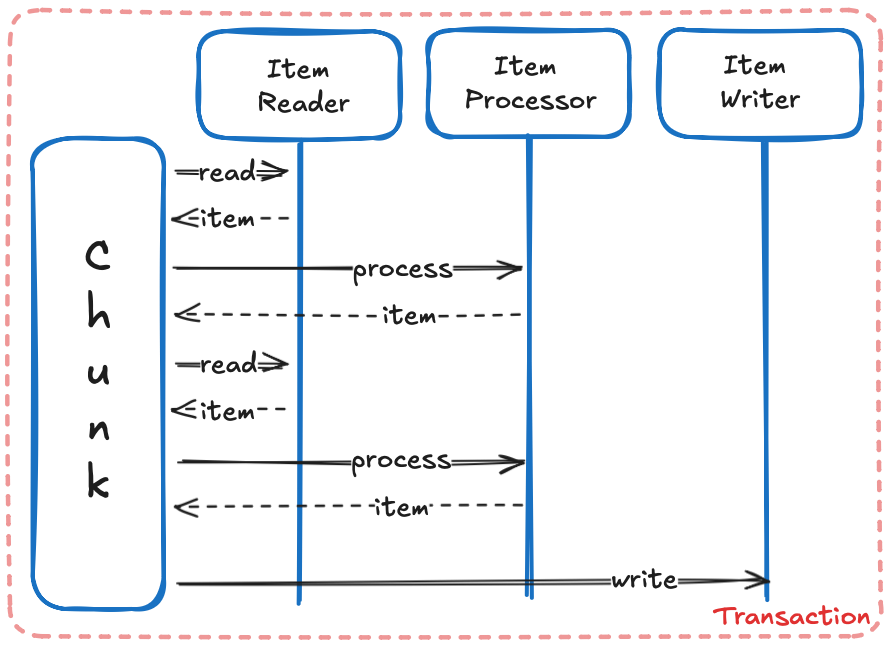
|
Each Chunk runs in a Transaction Boundary |
ItemReader
The ItemReader purpose is to read data, one item at a time from a data source (for instance a database or a file):
package org.acme.batch.chunk;

import java.io.FileInputStream;
import java.io.FileNotFoundException;
import java.io.Serializable;
import java.util.Optional;

import jakarta.batch.api.chunk.AbstractItemReader;
import jakarta.batch.api.chunk.ItemReader;
import jakarta.inject.Named;
import jakarta.json.Json;
import jakarta.json.JsonNumber;
import jakarta.json.JsonObject;
import jakarta.json.stream.JsonParser;

@Named
public class AuctionItemReader extends AbstractItemReader implements ItemReader {
    private JsonParser parser;

    @Override
    public void open(Serializable checkpoint) throws FileNotFoundException { (1)
        parser = Json.createParser(new FileInputStream("auctions.json"));
    }

    @Override
    public Object readItem() { (2)
        while (parser.hasNext()) {
            JsonParser.Event event = parser.next();
            if (event == JsonParser.Event.START_OBJECT) {
                JsonObject auction = parser.getObject();
                Long id = auction.getJsonNumber("id").longValue();
                String item = auction.getString("item");
                Long bid = Optional.ofNullable(auction.getJsonNumber("bid")).map(JsonNumber::longValue).orElse(0L);
                Long buyout = Optional.ofNullable(auction.getJsonNumber("buyout")).map(JsonNumber::longValue).orElse(0L);
                Integer quantity = auction.getInt("quantity");
                return new Auction(id, item, bid, buyout, quantity);
            }
        }
        return null;
    }

    @Override
    public void close() { (3)
        parser.close();
    }
}{
"id" : 238047206,
"item" : "Swift Spectral Tiger",
"buyout" : 4462800,
"quantity" : 1,
"time_left" : "SHORT"
}record Auction(Long id, String itemId, Long bid, Long buyout, Integer quantity) {}The AuctionItemReader implements three methods to:
| 1 | An open method to read a JSON file auctions.json |
| 2 | A readItem method to parse the file one auction item at a time into an Auction |
| 3 | A close method to free up resources when complete |
Each Auction can be passed down to an optional ItemProcessor and aggregated. Once the number of Auctions read
is equal to the configured item count for a Chunk, the list of Auctions is handed out to an ItemWriter, and then
the transaction is committed and a checkpoint created. The process repeats itself until ItemReader.readItem
returns null and the last items are written by the ItemWriter.
|
Use |
ItemProcessor
The ItemProcessor is an optional component that executes after each item is read:
package org.acme.batch.chunk;

import jakarta.batch.api.chunk.ItemProcessor;
import jakarta.inject.Named;

@Named
public class AuctionItemProcessor implements ItemProcessor {

    @Override
    public Object processItem(Object item) { (1)
        Auction auction = (Auction) item;
        if (auction.bid() <= 0 ||
                auction.buyout() <= 0 ||
                auction.quantity() <= 0 ||
                auction.buyout() < auction.bid()) {
            return null;
        }
        return auction;
    }
}| 1 | The processItem method takes an Auction from the ItemReader and validates some of its fields |
Returning null effectively indicates that the item should not be processed further, meaning that it will not be
included in the list of items to be handed over to the ItemWriter. The ItemProcessor may also change the
ItemReader item type. The new item type will be the one being passed down to the ItemWriter.
|
Use |
ItemWriter
The ItemWriter receives the list of read and processed items, which can be written to a database, to a file, or some
other suitable destination:
package org.acme.batch.chunk;

import java.io.Serializable;
import java.sql.Connection;
import java.sql.PreparedStatement;
import java.util.List;

import javax.sql.DataSource;

import jakarta.batch.api.chunk.AbstractItemWriter;
import jakarta.batch.api.chunk.ItemWriter;
import jakarta.inject.Inject;
import jakarta.inject.Named;

@Named
public class AuctionItemWriter extends AbstractItemWriter implements ItemWriter {
    @Inject
    DataSource dataSource;

    Connection connection;
    PreparedStatement insertStatement;

    @Override
    public void open(Serializable checkpoint) throws Exception { (1)
        connection = dataSource.getConnection();
        connection.setAutoCommit(false);
        insertStatement = connection.prepareStatement(
                "INSERT INTO auction (id, item_id, bid, buyout, quantity) VALUES (?, ?, ?, ?, ?)");
    }

    @Override
    public void writeItems(List<Object> items) throws Exception { (2)
        for (Object item : items) {
            Auction auction = (Auction) item;
            insertStatement.setLong(1, auction.id());
            insertStatement.setString(2, auction.itemId());
            insertStatement.setLong(3, auction.bid());
            insertStatement.setLong(4, auction.buyout());
            insertStatement.setInt(5, auction.quantity());
            insertStatement.addBatch();
        }
        insertStatement.executeBatch();
    }

    @Override
    public void close() throws Exception { (3)
        if (insertStatement != null) {
            insertStatement.close();
        }
        if (connection != null) {
            connection.close();
        }
    }
}| 1 | An open method to get a database Connection and create a PreparedStatement with an insert query |
| 2 | A writeItems method to iterate over the items and batch the insert statements |
| 3 | A close method to free up resources when complete |
Once the ItemWriter completes, the Chunk is committed, and a new cycle starts until all items are read.
The Job
All three of the Chunk processing components, the ItemReader, the ItemProcessor and the ItemWriter must be
assembled in a Job definition:
<?xml version="1.0" encoding="UTF-8"?>
<job id="auctionsJob" xmlns="https://jakarta.ee/xml/ns/jakartaee" version="2.0">
  <step id="auctionsStep">
    <chunk>
      <reader ref="auctionItemReader"/>         (1)
      <processor ref="auctionItemProcessor"/>   (2)
      <writer ref="auctionItemWriter"/>         (3)
    </chunk>
  </step>
</job>|
The Job XML Definition file must be placed in |
| 1 | The auctionItemReader is the reference name of the AuctionItemReader. By default, a Batch component’s
default name is its Fully Qualified Name (org.acme.batch.chunk.AuctionItemReader). When a Batch component is annotated
with @Named, its name is shortened to the component’s simple name with the first letter lowercase
(auctionItemReader). |
| 2 | The auctionItemProcessor reference name of the AuctionItemProcessor |
| 3 | The auctionItemWriter reference name of the AuctionItemWriter |
To execute this Job:
import jakarta.batch.operations.JobOperator;
import jakarta.batch.runtime.BatchRuntime;
import java.util.Properties;
import jakarta.inject.Inject;

@Inject
JobOperator jobOperator;

void execute() {
    long executionId = jobOperator.start("auctionsJob", new Properties());
}|
Use |
Chunk configuration
The chunk element definition supports several attributes that control how chunk processing behaves:
Chunk Attributes |
Type |
Default |
|---|---|---|
Configures the checkpoint policy commit behavior for the chunk. Valid values are: |
String |
|
Configures the number of items to process per chunk when using the |
int |
|
Configures the amount of time in seconds before taking a checkpoint for the |
int |
|
Configures the number of exceptions a chunk step can skip if the chunk processing throws any configured skippable exceptions before failing the job. If left unset, there is no limit. |
int |
|
Configures the number of exceptions a chunk step can retry if the chunk processing throws any configured retryable exceptions before failing the job. If left unset, there is no limit. |
int |
chunk element attributes<chunk
item-count="100"
time-limit="180"
skip-limit="10"
retry-limit="3"
checkpoint-policy="item">
</chunk>|
The optional chunk |
Exception Handling
If an exception is thrown within the processing of a chunk, the job execution ends with a status of FAILED. This
behaviour can be overridden by configuring exceptions to skip or retry.
skippable-exception-classes
When an exception is configured in skippable-exception-classes and such an exception occurs when reading, processing,
or writing, the item or chunk will be skipped, and the process will continue to the next chunk. If the number of
skipped exceptions exceeds the chunk skip-limit configuration, the job fails.
skippable-exception-classes<skippable-exception-classes>
<include class="java.lang.Exception"/>
<exclude class="java.io.FileNotFoundException"/>
</skippable-exception-classes>The include element configures the exceptions to skip. The exclude element configures the exceptions not to skip.
Use exclude to reduce the number of exceptions eligible to skip from the include element. Exceptions must be
configured by their fully qualified name. The include or exclude applies to the entire hierarchy of the configured
exception.
The preceding example would skip all exceptions except java.io.FileNotFoundException, (along with any subclasses of
java.io.FileNotFoundException).
retryable-exception-classes
When an exception is configured in retryable-exception-classes and such an exception occurs when reading, processing,
or writing, the item or chunk will be retried. If the number of retried exceptions exceeds the chunk retry-limit
configuration, the job fails.
skippable-exception-classes<retryable-exception-classes>
<include class="java.io.IOException"/>
<exclude class="java.io.FileNotFoundException"/>
</retryable-exception-classes>The include element configures the exceptions to retry. The exclude element configures the exceptions not to retry.
Use exclude to reduce the number of exceptions eligible to retry from the include element. Exceptions must be
configured by their fully qualified name. The include or exclude applies to the entire hierarchy of the configured
exception.
The preceding example would retry all java.io.IOException except java.io.FileNotFoundException, (along with any
subclasses of each exception).
Retry and Skip
Retry has precedence over skip. While the chunk is retrying, skippable takes precedence over retryable since the exception is already being retried.
no-rollback-exception-classes
When a write operation fails with a retryable exception, the entire chunk rolls back, and each item in the chunk is
reprocessed item by item (as if the chunk was configured with item-count=1) to identify which specific item(s)
caused the failure.
When an exception is configured in both retryable-exception-classes and no-rollback-exception-classes, the
operation is retried, but no rollback occurs.
skippable-exception-classes<no-rollback-exception-classes>
<include class="java.io.IOException"/>
</no-rollback-exception-classes>The preceding example would retry all java.io.IOException, but without rolling back the entire chunk.
Checkpoint Algorithm
A custom checkpoint-policy provides programmatic control over checkpoint decisions, beyond default item:
package org.acme.batch.chunk;

import java.io.Serializable;

import jakarta.batch.api.chunk.AbstractCheckpointAlgorithm;
import jakarta.batch.runtime.context.StepContext;
import jakarta.inject.Inject;
import jakarta.inject.Named;

@Named
public class AuctionCheckpointAlgorithm extends AbstractCheckpointAlgorithm {
    @Inject
    StepContext stepContext;

    @Override
    public boolean isReadyToCheckpoint() {
        AuctionCheckpointData auctionCheckpointData = (AuctionCheckpointData) stepContext.getPersistentUserData(); (1)
        return auctionCheckpointData.quantity() >= 1000; (2)
    }

    public record AuctionCheckpointData(int quantity) implements Serializable {
    }
}| 1 | Retrieves persistent data AuctionCheckpointData from the StepContext, which contains how many quantities of
each Auction were processed |
| 2 | Signals the chunk to checkpoint if the sum of all Auctions quantities is at least 1000 |
|
The |
Restart
When a Job is not complete, it can be restarted from its last recorded checkpoint. A chunk that is complete and
belongs to a step configured with allow-start-if-complete=true, runs from the beginning when restarted.
Listeners
Listeners are callback components that receive notifications at specific points during chunk processing. They allow you to inject custom logic before and after chunk operations:
-
jakarta.batch.api.chunk.listener.ChunkListener -
jakarta.batch.api.chunk.listener.ItemReadListener -
jakarta.batch.api.chunk.listener.ItemProcessListener -
jakarta.batch.api.chunk.listener.ItemWriteListener -
jakarta.batch.api.chunk.listener.SkipReadListener -
jakarta.batch.api.chunk.listener.SkipProcessListener -
jakarta.batch.api.chunk.listener.SkipWriteListener -
jakarta.batch.api.chunk.listener.RetryReadListener -
jakarta.batch.api.chunk.listener.RetryProcessListener -
jakarta.batch.api.chunk.listener.RetryWriteListener
package org.acme.batch.chunk;

import java.io.Serializable;

import jakarta.batch.api.chunk.AbstractCheckpointAlgorithm;
import jakarta.batch.runtime.context.StepContext;
import jakarta.inject.Inject;
import jakarta.inject.Named;

@Named
public class AuctionCheckpointAlgorithm extends AbstractCheckpointAlgorithm {
    @Inject
    StepContext stepContext;

    @Override
    public boolean isReadyToCheckpoint() {
        AuctionCheckpointData auctionCheckpointData = (AuctionCheckpointData) stepContext.getPersistentUserData(); (1)
        return auctionCheckpointData.quantity() >= 1000; (2)
    }

    public record AuctionCheckpointData(int quantity) implements Serializable {
    }
}
Listeners may be configured at the step level where the chunk is defined:
<?xml version="1.0" encoding="UTF-8"?>
<job id="auctionsJob" xmlns="https://jakarta.ee/xml/ns/jakartaee" version="2.0">
  <step id="auctionsStep">
    <listeners>
      <listener ref="auctionItemReadListener"/>
    </listeners>
    <chunk>
      <reader ref="auctionItemReader"/>
      <processor ref="auctionItemProcessor"/>
      <writer ref="auctionItemWriter"/>
    </chunk>
  </step>
</job>